SEO & AI Search
Free SEO Tools for Bloggers: 10 Tools and What They Showed on a Real Blog
By Bibek Thapa · Updated · 12 min read
Quick Answer
The best free SEO tools for bloggers are Google Search Console and Bing Webmaster Tools for search data, Google Analytics and Microsoft Clarity for visitor behavior, and PageSpeed Insights and the Rich Results Test for technical checks. Start with Search Console, add Bing, then add others only when you have a question they answer. All are free for sites you own.

Table of ContentsOn this page
- Free SEO tools for bloggers compared
- Which free SEO tools to set up first
- The 10 best free SEO tools for bloggers
- Free SEO tools for WordPress and Blogger
- A 30-minute weekly routine
- When free tools stop being enough
- Mistakes that waste free SEO tools for bloggers
- Frequently Asked Questions
- Sources and References
Key Takeaways
- Start with Search Console and Bing Webmaster Tools. They use real data from your own site, not estimates.
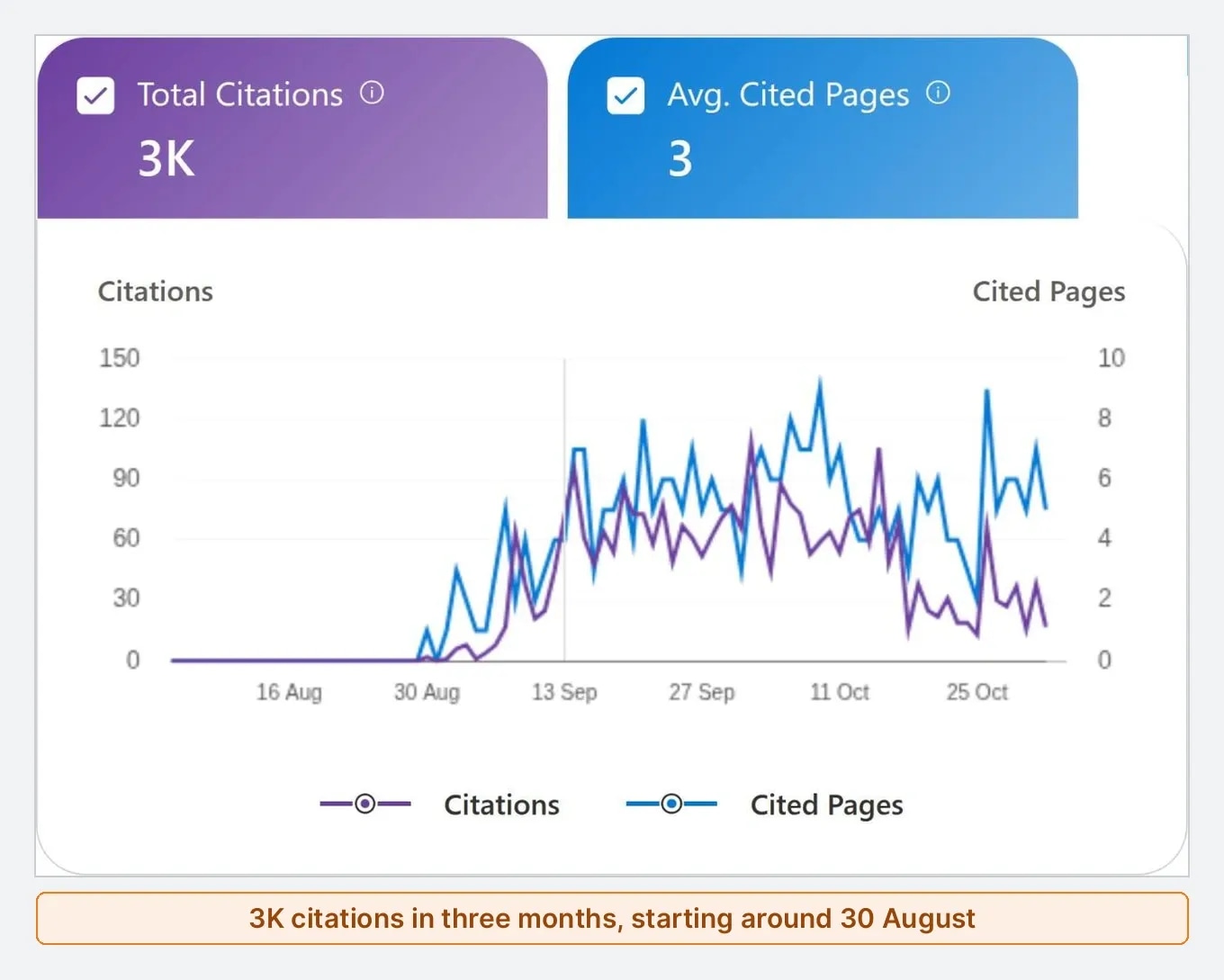
- Bing's free AI Performance report showed 3K Copilot citations for Anobee and the queries behind them.
- Read the numbers before you trust them: 13K of Anobee's 14.2K Bing impressions came from spreadsheet rows, not searches.
- PageSpeed Insights found only 6.4 KiB of image savings on a tested page, so that work could be skipped.
- Pay for a tool only when a free limit blocks a decision you make every week.
The best free SEO tools for bloggers are the ones connected to your own site. Google Search Console and Bing Webmaster Tools show real search data. Google Analytics and Microsoft Clarity show what visitors do. PageSpeed Insights and the Rich Results Test check the technical side. That small set answers most questions a blog has, and none of it costs money.
Most lists stop at naming tools. This one shows what the tools actually reported on Anobee, a small blog run from Nepal. Some of it was strange. Bing showed 3K citations in Microsoft Copilot that no other tool had revealed. It also showed 14.2K impressions, about 13K of which were not real searches.
How this guide was checked: the results below come from Anobee's own accounts and pages on 3 and 4 November 2026, viewed read-only. The table shows how Anobee used each tool, or says that only the vendor's page was checked. Limits were read on the vendors' pages on 4 November 2026. No tool paid to be included, and limits can change, so check them before you rely on one.
Free SEO tools for bloggers compared
| Tool | Job | Free limit or catch | Anobee's use |
|---|---|---|---|
| Google Search Console | Google queries, clicks, pages | Verified sites only | 16-month content audit |
| Bing Webmaster Tools | Bing data and AI citations | Verified sites only | Citations and queries |
| Google Analytics | Behavior after the click | Needs careful setup | Event check |
| Microsoft Clarity | Heatmaps and recordings | Free; needs a tracking script | Installed |
| PageSpeed Insights | Speed diagnosis | Small sites may lack field data | One article test |
| Rich Results Test | Structured data check | Passing does not promise a rich result | This page |
| Ahrefs Free | Site audit and backlinks | Verified sites; 5K crawl credits a month | Free checker only |
| Screaming Frog | Site crawl | 500 URLs per crawl | Vendor page only |
| Google Trends | Relative demand | No search volumes | Help page only |
| Google Keyword Planner | Keyword ideas | Needs billing details | Not used |
Which free SEO tools to set up first
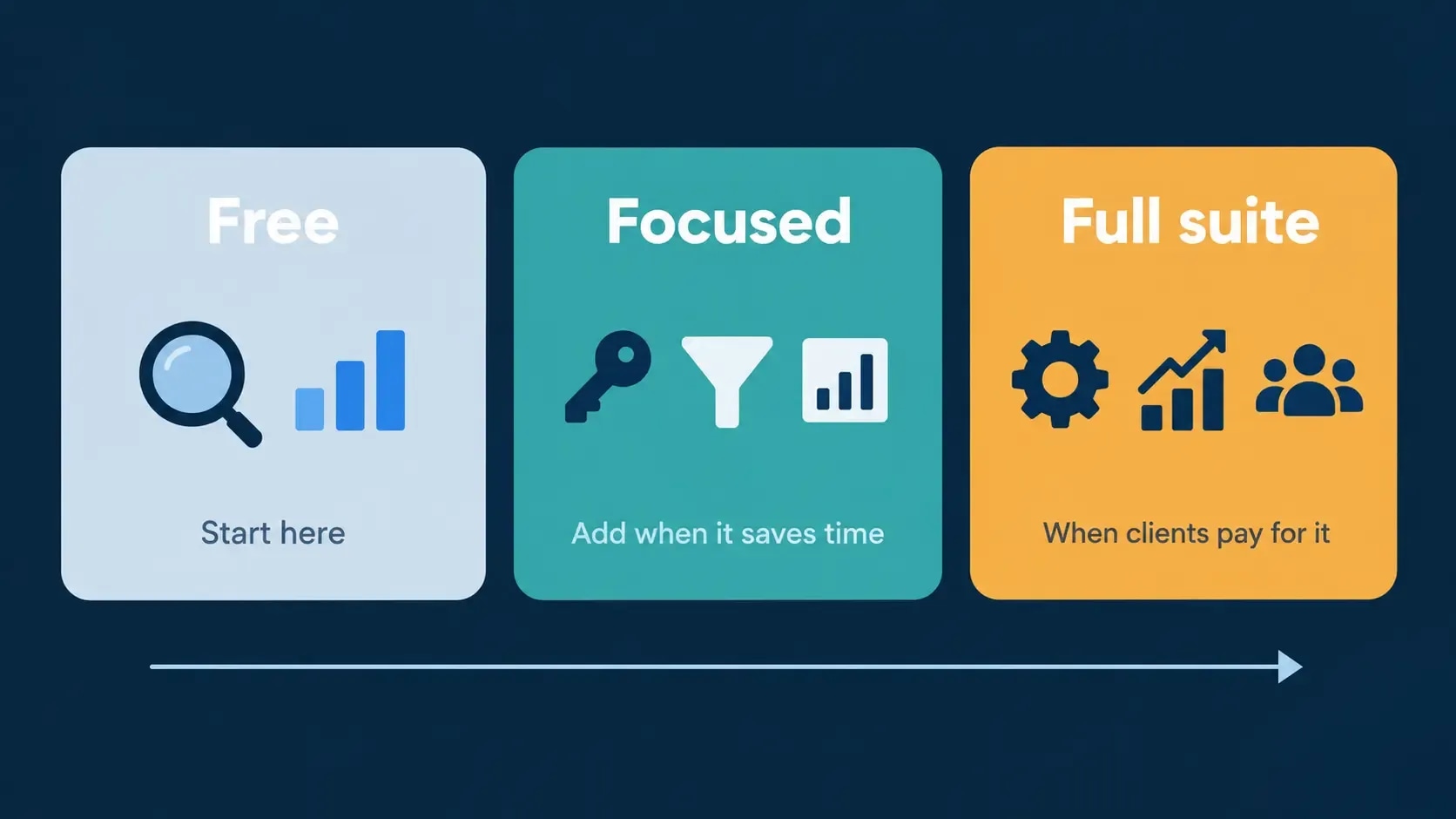
Set up the first two today. Add the others when a real question appears.
- Today: Search Console and Bing Webmaster Tools.
- This week: Google Analytics, if you want to know what visitors do next.
- A page feels slow: PageSpeed Insights.
- You add structured data: the Rich Results Test.
- You plan new topics: Google Trends, then a keyword tool.
A blog with ten posts does not need a crawler. It needs to know which posts Google already shows, and Search Console answers that.
The 10 best free SEO tools for bloggers
1. Google Search Console: your real Google data
Search Console shows the queries and pages that earn clicks and impressions in Google, with click-through rate and average position [1]. It should be the first tool on any blog. Setup takes minutes with the Google Search Console setup guide.
What it showed on Anobee: a 16-month export of every page drove a full content audit. It split 113 pages into keep, refresh and rewrite, and showed 14 pages that Google displayed but ranked at about position 40 to 85. Those became a rewrite list, which is why this article was rewritten.
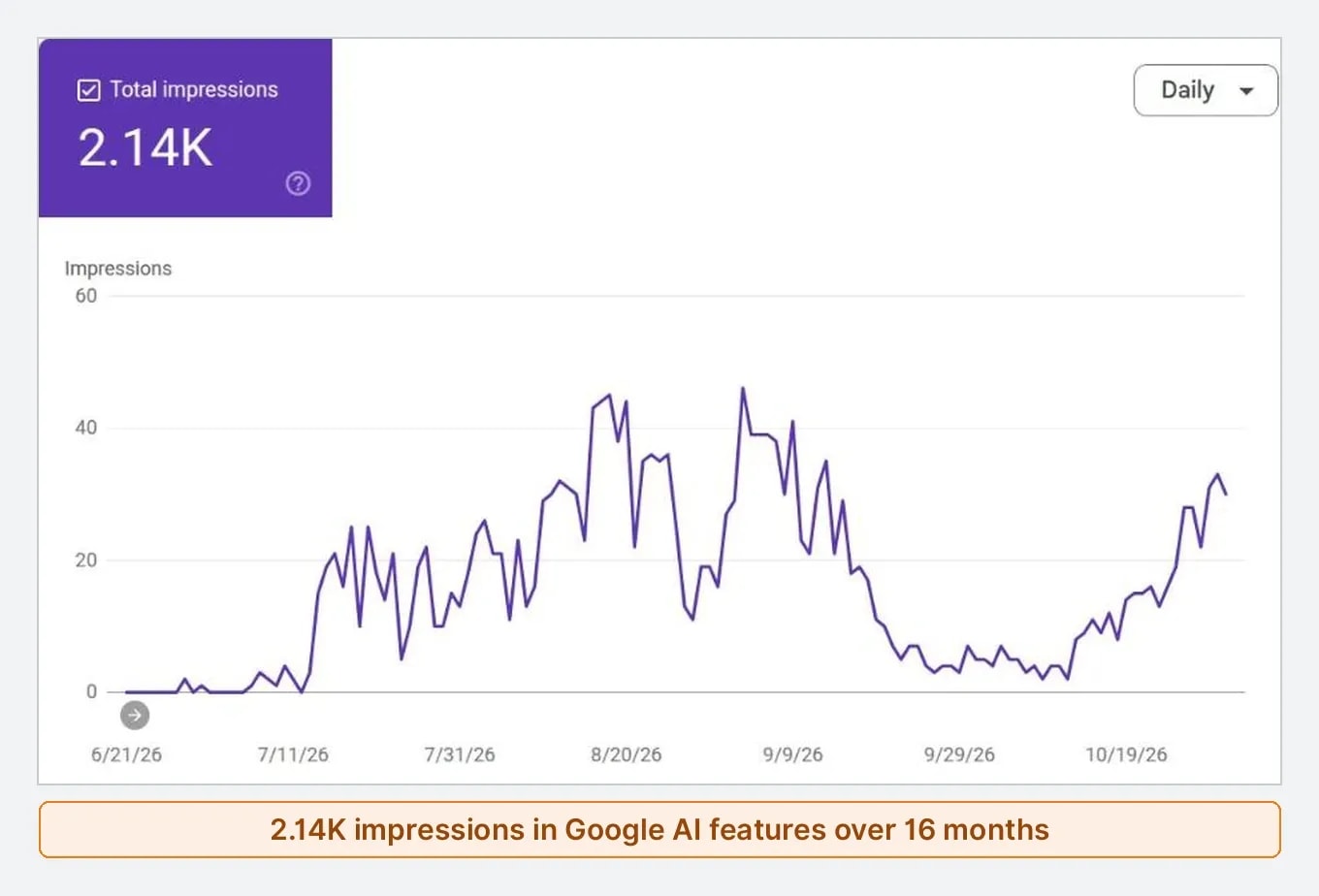
A newer free report, called Generative AI, counts impressions in AI Overviews and AI Mode [3]. Anobee had 2.14K of those over 16 months, against 47K web impressions. The report lists pages but no queries, so you can see where you appear and not why.
One trap: page-level average position can flatter you. Anobee's earning guide averaged position 11.2, while its main queries sat roughly between 20 and 37. Open the Queries tab before you celebrate.
2. Bing Webmaster Tools: the free report most bloggers skip
Bing Webmaster Tools gives you Bing search data, backlinks, keyword research and site scans for verified sites. You can import a site from Search Console, which saves setup time. Its best feature for bloggers is newer.
The AI Performance report shows how often Microsoft Copilot, Bing's AI summaries and partner products cite your site. It also lists the cited pages and the grounding queries, which are the phrases the AI used to retrieve your content [2]. Bing says these counts are a sample, and that they do not show ranking or placement inside an answer [2].
What it showed on Anobee: 3K citations in three months, starting around late August 2026.
| Cited page | Citations |
|---|---|
| SEO for affiliate marketing | 1.6K |
| How to check AI citations | 276 |
| Best AI SEO tools | 220 |
| Earn online in Nepal | 110 |
| Entity optimization for AI search | 102 |
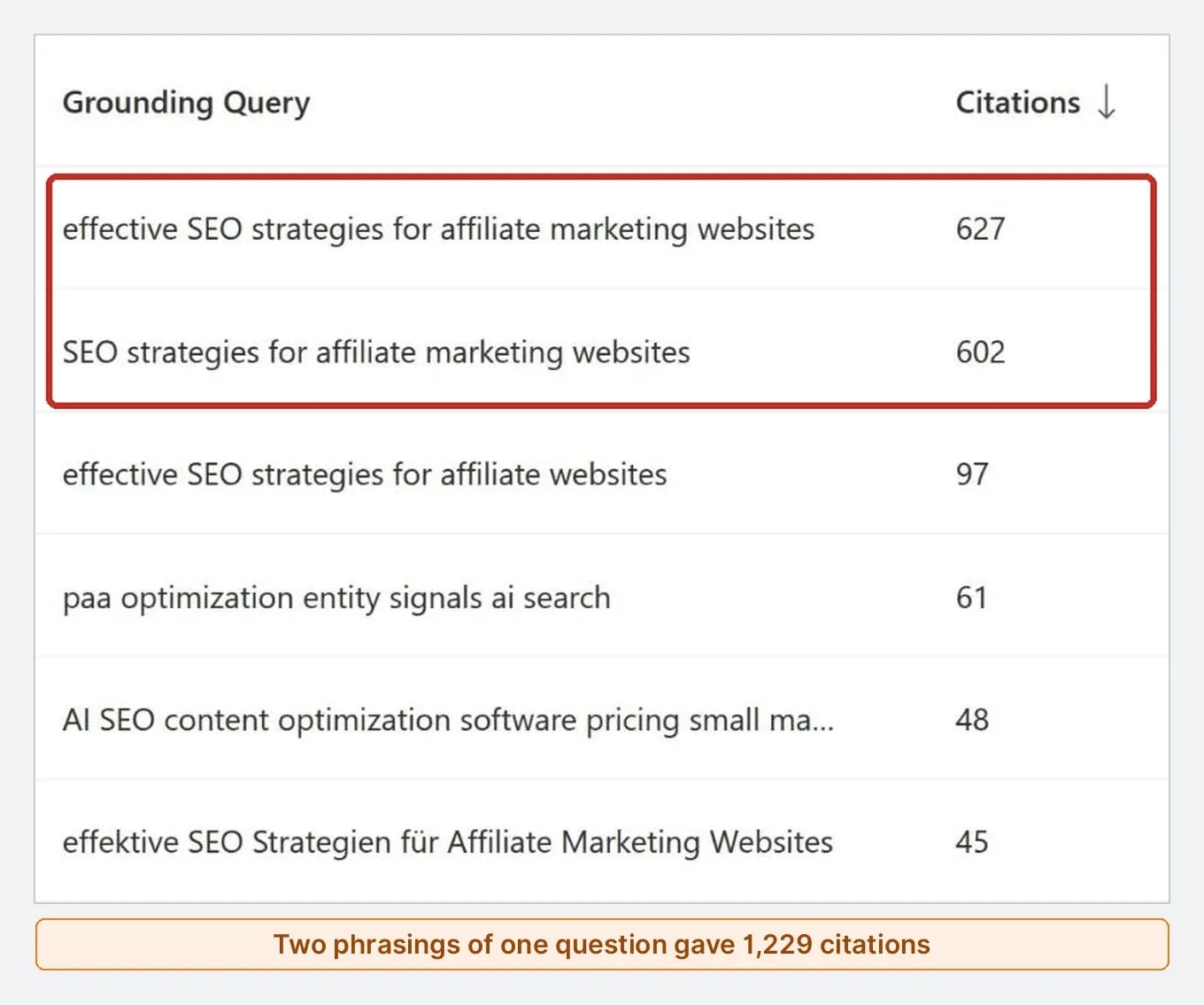
Two grounding queries, both about SEO strategies for affiliate marketing websites, gave over 1,200 of those citations. That page earned very little attention in Google, so this was a real surprise. No other free tool in this list showed it.
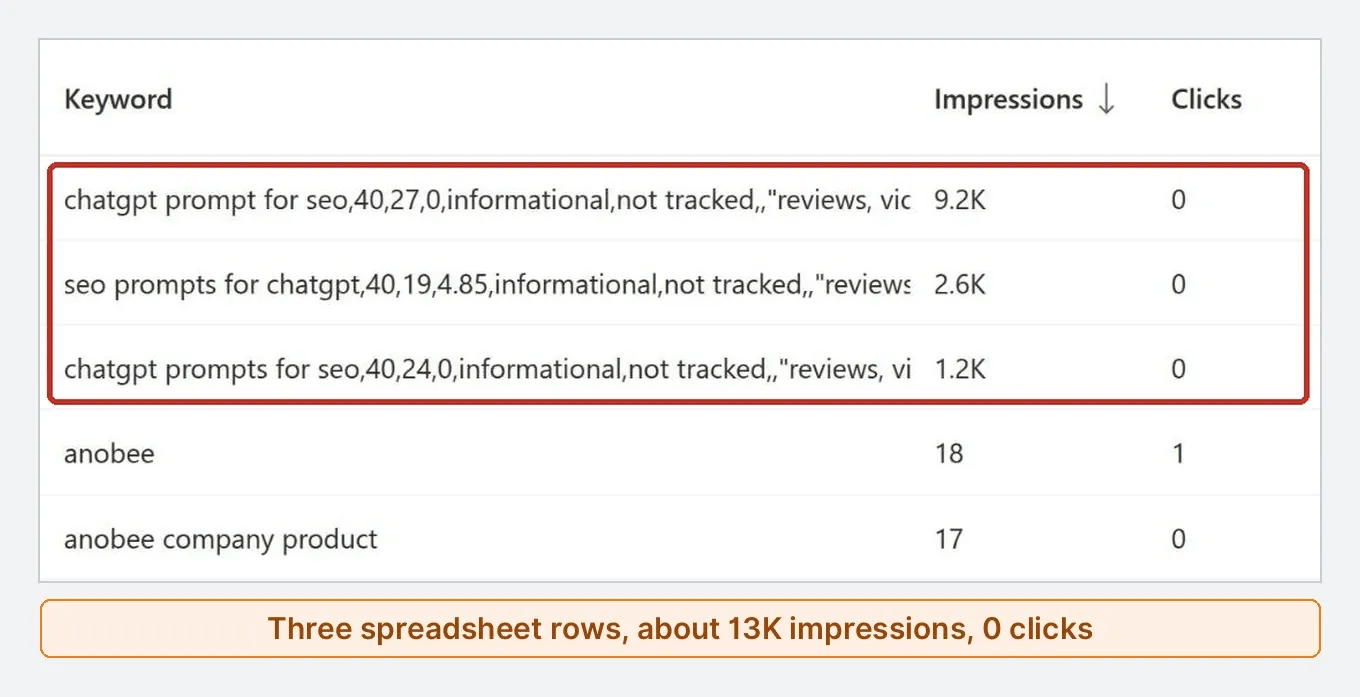
The trap is in the same account. Its Search Performance report showed 14.2K impressions and 6 clicks in three months. The top "keywords" were not searches at all. They were whole rows from someone's keyword spreadsheet, such as chatgpt prompt for seo,40,27,0,informational,not tracked, and three of those rows made up about 13K impressions with no clicks. Real brand searches were in the tens. Always read the query text, because a big number can be noise.
3. Google Analytics: what happens after the click
Search Console stops at the search result. Google Analytics shows what visitors do next, and the standard version is free [4].
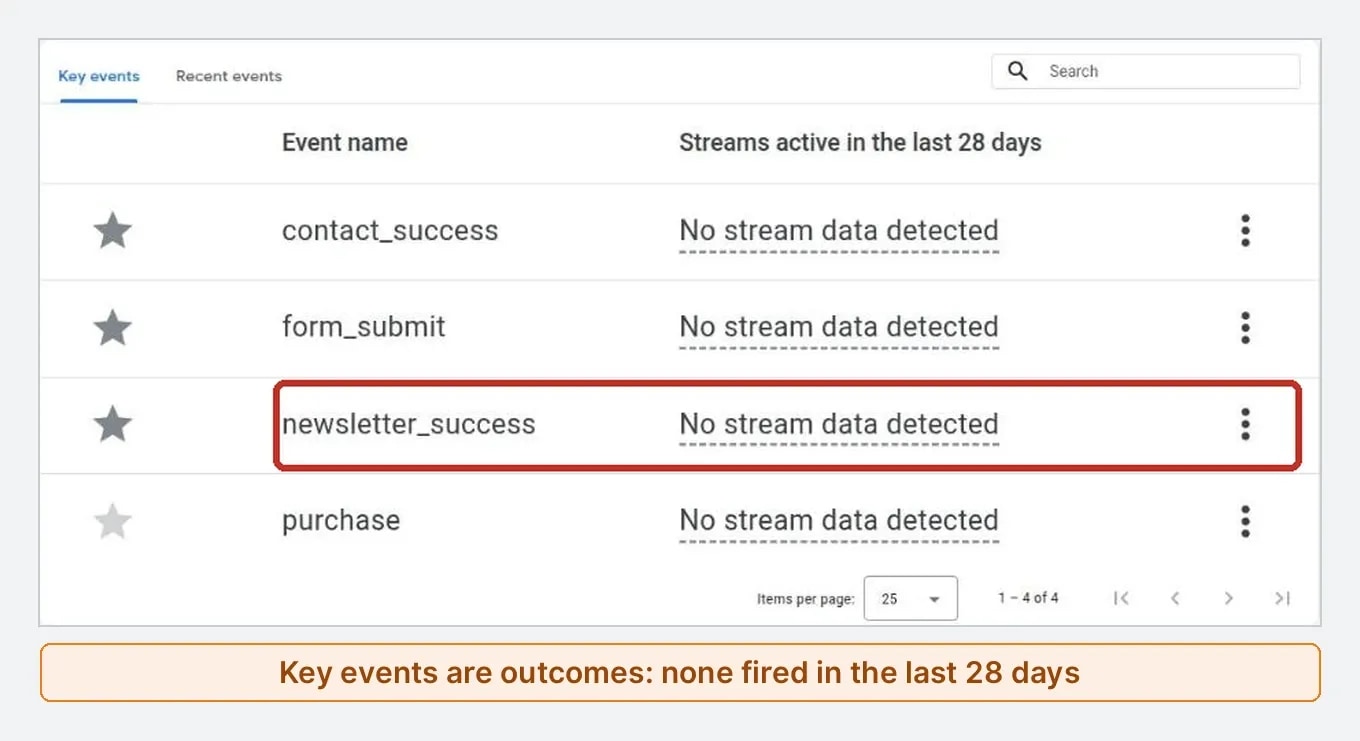
What it showed on Anobee: the event list made one problem clear. The site records newsletter_submit on every attempt and newsletter_success only on a confirmed signup. In a 28-day window the attempt appeared and the success did not. A report that only counts attempts would have looked healthier than it was.
Setup is the hard part. The Google Analytics setup guide covers it step by step, with Anobee's real settings.
4. Microsoft Clarity: see where readers get stuck
Clarity records heatmaps and sessions, so you can see where people click, scroll and leave. Microsoft describes it as free forever, with no limits on traffic [5].
Anobee runs Clarity across the site. It suits a question such as "do readers reach the table?", which numbers alone answer badly. Read the Microsoft Clarity guide before installing, and mention it in your privacy notice.
5. PageSpeed Insights: find out if speed is really the problem
PageSpeed Insights tests one URL and reports lab results, plus real-user data when a page has enough visits [6]. Small blogs often see no real-user data, so treat the lab score as a diagnosis.
What it showed on Anobee: a mobile test of one article found 6.4 KiB of image savings, all from the header logo. That saved a day of recompressing images that were already fine. The full result is in the image optimization guide.
6. Rich Results Test: confirm your markup works
The Rich Results Test checks whether Google can read the structured data on a live URL. Structured data helps Google understand a page, but it does not promise a rich result [7].
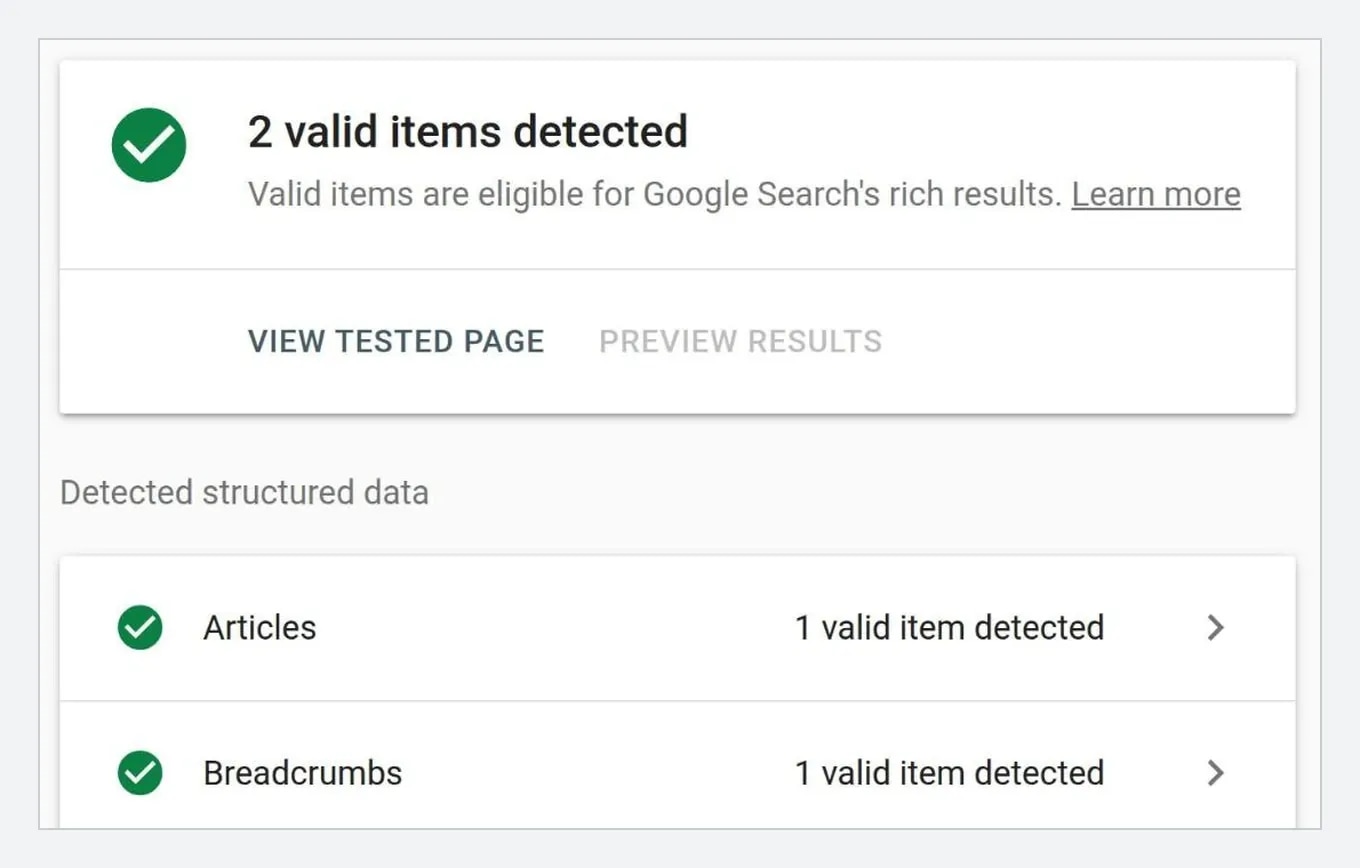
What it showed on Anobee: this page returned 2 valid items, one Article and one Breadcrumb, on 4 November 2026. Test the live URL after a theme or plugin change, not just the code you pasted.
7. Ahrefs Free: audit your own site
Ahrefs Free is for websites you can verify. It includes Site Audit with 5,000 crawl credits per project each month, and Site Explorer with up to 1,000 backlinks and keywords visible at once [8]. That suits your own blog, not wider competitor research.
Anobee has not run this audit, so this entry rests on Ahrefs' page. Anobee did use the separate free AI Visibility Checker, which needs no sign-up. It returned one mention, and that mention belonged to a paint brush brand with the same name. The AI visibility tools guide has the full result.
8. Screaming Frog: crawl a small blog
Screaming Frog is a desktop crawler that finds broken links, redirect chains, missing titles and thin pages. The free version crawls up to 500 URLs at a time, and a licence costs £199 a year [9]. Remember that tags, archives and images use up that allowance.
Anobee has not used it for this guide. It becomes useful once a blog has enough pages that you cannot check them by hand.
9. Google Trends: compare interest, not volume
Google Trends compares topics by time and place. It scales results from 0 to 100, so it shows relative interest and not a count of searches [10]. Use it to compare two topic ideas, or to see when a subject peaks each year.
Anobee has not used it for this guide. A useful habit is to set the country you actually write for, because a global chart can mislead a Nepal-focused blog.
10. Google Keyword Planner: ideas with a catch
Keyword Planner suggests keywords and estimates monthly searches, but you must finish a Google Ads account setup, including billing information, to reach basic features [11]. Its Competition column measures advertisers, not how hard a keyword is to rank for.
Anobee does not rely on it. For more choices, see the guide to keyword research tools for freelancers.
Free SEO tools for WordPress and Blogger
Most free SEO tools for bloggers work on any platform. Your platform adds the last piece: controlling titles, descriptions and sitemaps.
- WordPress: use one SEO plugin only. Rank Math and Yoast both have free versions, and running two can create conflicting sitemaps and canonicals. The Rank Math setup guide covers the settings that matter.
- Blogger or Blogspot: plugins do not work here. Use Blogger's own settings for search descriptions and custom robots tags. Search Console, Bing, Analytics and PageSpeed all work as normal.
To check a single article, use a free SEO content checker. Anobee ran one article through five of them, and the scores ranged from 64 to 87. The SEO content checker test shows what each one misses.
A 30-minute weekly routine
Free SEO tools for bloggers help only when they lead to a decision. This routine fits a one-person blog:
- Open Search Console and compare the last 28 days with the 28 days before.
- Note one page gaining impressions and one losing clicks.
- Open Bing's AI Performance report and check for new grounding queries.
- Read the search results for one query, and decide if the problem is the title, the content or the intent.
- Make one change, and note the date, URL and reason.
One change a week beats six open dashboards.
When free tools stop being enough
Do not upgrade because the blog reached a certain size. Pay when a free limit repeatedly blocks a decision, such as:
- researching competitors every week
- tracking many keywords on a fixed schedule
- crawling more than 500 URLs
- reporting to clients
Write down the blocked task first. If you cannot name the decision the paid data would change, keep the free stack.
Mistakes that waste free SEO tools for bloggers
- Treating third-party scores as Google data. Google says third-party tools cannot access its internal ranking data [12]. Difficulty and authority scores are estimates.
- Believing a big number without reading it. Anobee's 14.2K Bing impressions were mostly spreadsheet rows.
- Chasing a green plugin score. A checklist score is not a ranking.
- Trusting a page average. Check queries, not only the page's average position.
- Skipping Bing. Anobee's Copilot citations would have stayed invisible.
If you only do one thing today, verify your blog in Search Console and Bing. Those two free SEO tools for bloggers will show you more about your own site than any list can.
Frequently Asked Questions
What are the best free SEO tools for beginners?
Start with Google Search Console, then add Bing Webmaster Tools and Google Analytics. These three show what your own site is really doing, and they do not cost anything. Add PageSpeed Insights when you suspect a speed problem. A beginner blog does not need a keyword tool on day one.
Are there free SEO tools for Blogger or Blogspot?
Yes. Search Console, Bing Webmaster Tools, Google Analytics, PageSpeed Insights and the Rich Results Test all work with a Blogger site, because they do not depend on WordPress. Plugins such as Rank Math and Yoast do not work on Blogger. Set titles and search descriptions in Blogger's own settings instead.
Is Ahrefs free for bloggers?
Partly. Ahrefs Free gives verified site owners Site Audit with 5,000 crawl credits per project each month, and Site Explorer with up to 1,000 backlinks and keywords visible at once. It covers your own verified sites, not open competitor research. The separate free AI Visibility Checker needs no sign-up.
Can free SEO tools replace paid tools?
For a small blog, usually yes. Free tools cover your own search data, speed, markup and on-page checks. Paid tools add competitor research at scale, rank tracking and larger crawls. Pay when a free limit repeatedly blocks a decision you need to make, not because the blog has reached a certain size.
Which free tool shows AI citations?
Bing Webmaster Tools has a free AI Performance report that shows citations in Microsoft Copilot and partner products, the pages cited and the grounding queries. Google Search Console has a Generative AI report that shows impressions by page, without queries. Neither covers ChatGPT or Perplexity.
Sources and References
- Google Search Console Help: Performance report ↩
- Bing Webmaster Blog: Introducing AI Performance in Bing Webmaster Tools Public Preview ↩
- Google Search Central Blog: Search Generative AI performance reports in Search Console ↩
- Google Marketing Platform: Google Analytics ↩
- Microsoft Clarity ↩
- Google for Developers: About PageSpeed Insights ↩
- Google Search Central: Structured data markup ↩
- Ahrefs: Ahrefs Free ↩
- Screaming Frog: SEO Spider ↩
- Google Trends Help: FAQ about Google Trends data ↩
- Google Ads Help: Use Keyword Planner ↩
- Google Search Central: Third-party SEO guidance ↩
Was this guide helpful?
Your answer helps Anobee improve future updates.

Written by
Bibek Thapa
AI-Powered Digital Growth Strategist
Bibek Thapa works across AI workflows, SEO, AI search optimization, content strategy, website growth, and productivity systems at Anobee.
- AI workflows
- Digital growth
- SEO
- GEO
- AEO
- Content strategy
- Website growth