SEO & AI Search
SEO Content Checker: 5 Free Tools Tested on the Same Article (2026)
By Bibek Thapa · Updated · 9 min read
Quick Answer
For a free SEO content checker, paste your text and keyword into SEO Review Tools, Content Analysis, or run your URL through Seobility or the Rank Math SEO Analyzer. On the same article they scored 64, 87% and 82. All three check titles, headings, keywords and technical basics. None checks accuracy, originality or search intent, so read the score as a checklist.

Table of ContentsOn this page
- SEO content checker results at a glance
- What does an SEO content checker actually check?
- The five free SEO content checkers, tested
- Why the scores disagree
- What no SEO content checker caught
- How to use an SEO content checker without keyword stuffing
- When a paid content optimization tool makes sense
- Frequently Asked Questions
- Sources and References
Key Takeaways
- One article, five free checkers, 3 November 2026: SEO Review Tools 64, Rank Math 82, Seobility 87%. Plerdy wanted an email, SEOptimer hit a daily limit.
- Text checkers score what you paste. Empty title and meta fields pulled SEO Review Tools down to 64 although its content score was 85.
- URL checkers mix content with server checks. Rank Math failed the page on JavaScript minification and a mobile test that did not run.
- None of the free tools judges accuracy, originality or search intent, the things Google's helpful content guidance asks about.
- The same site holds an AdSense low value content status, so a high checker score is not proof of quality.
An SEO content checker reads a page or a block of text and flags missing basics. Typical flags are a keyword absent from the title, no H1, thin text, too few links or a slow server. To see how much the free ones agree, Anobee ran the same live article through five of them on 3 November 2026. The scores ranged from 64 to 87. Yet no tool checked whether the article was accurate, original or useful, which is what decides whether it deserves to rank.
How the test worked: the test page was Anobee's Google AdSense approval guide, 1,588 words in the body, with the target keyword "google adsense approval". Each tool was used signed out, on its free tier, with the keyword where the tool asked for one. Nothing was bought and no email was entered. Cookie banners were dismissed without accepting optional cookies. Scores and limits are what each tool showed on that day.
SEO content checker results at a glance
| Tool | Input | Free access | Score on the test article | What pulled the score down |
|---|---|---|---|---|
| SEO Review Tools, Content Analysis | Pasted text plus keyword | No account | 64/100 (content score 85) | Empty title and meta description fields [1] |
| Rank Math SEO Analyzer | URL | No account | 82/100, 24 of 28 tests passed | Link ratio, response time, JavaScript, mobile test [3] |
| Seobility SEO Checker | URL | 3 checks a day | 87% on-page score | Links 48%, server 78%, external factors 3% [2] |
| Plerdy SEO Content Checker | URL or text | Email required | Not shown | Results stayed behind an email form [4] |
| SEOptimer | URL | Daily report limit | Not run on the article | Daily limit reached; report covered the domain [5] |
Semrush's SEO Writing Assistant also ranks for this search [6]. It runs inside a Semrush account, so it was left out of a signed-out test.
What does an SEO content checker actually check?
Most free checkers look at four groups of signals:
- Keyword placement. Is the keyword in the title, H1, first paragraph, and image alt text, and how often does it appear?
- Structure. Is there one H1, are there subheadings, how long is the text?
- Metadata. Is there a title tag and meta description, and are they a sensible length?
- Technical basics. For URL checkers: status code, indexability, response time, file size, and link counts.
What they do not check matters more. No free SEO content checker tested here could tell whether a claim was true. Nor could it tell whether the page added anything new or answered the search. Google's helpful content guidance asks exactly those questions. It even asks whether you are writing to a word count because you think Google prefers one, and it answers that Google does not [7].
The five free SEO content checkers, tested
1. SEO Review Tools: the best checker for pasted text
SEO Review Tools' Content Analysis is an editor: paste your draft, enter a focus keyword, and it grades the text as you type [1]. It needs no account, which makes it the closest match to what most people mean by "content checker for SEO".
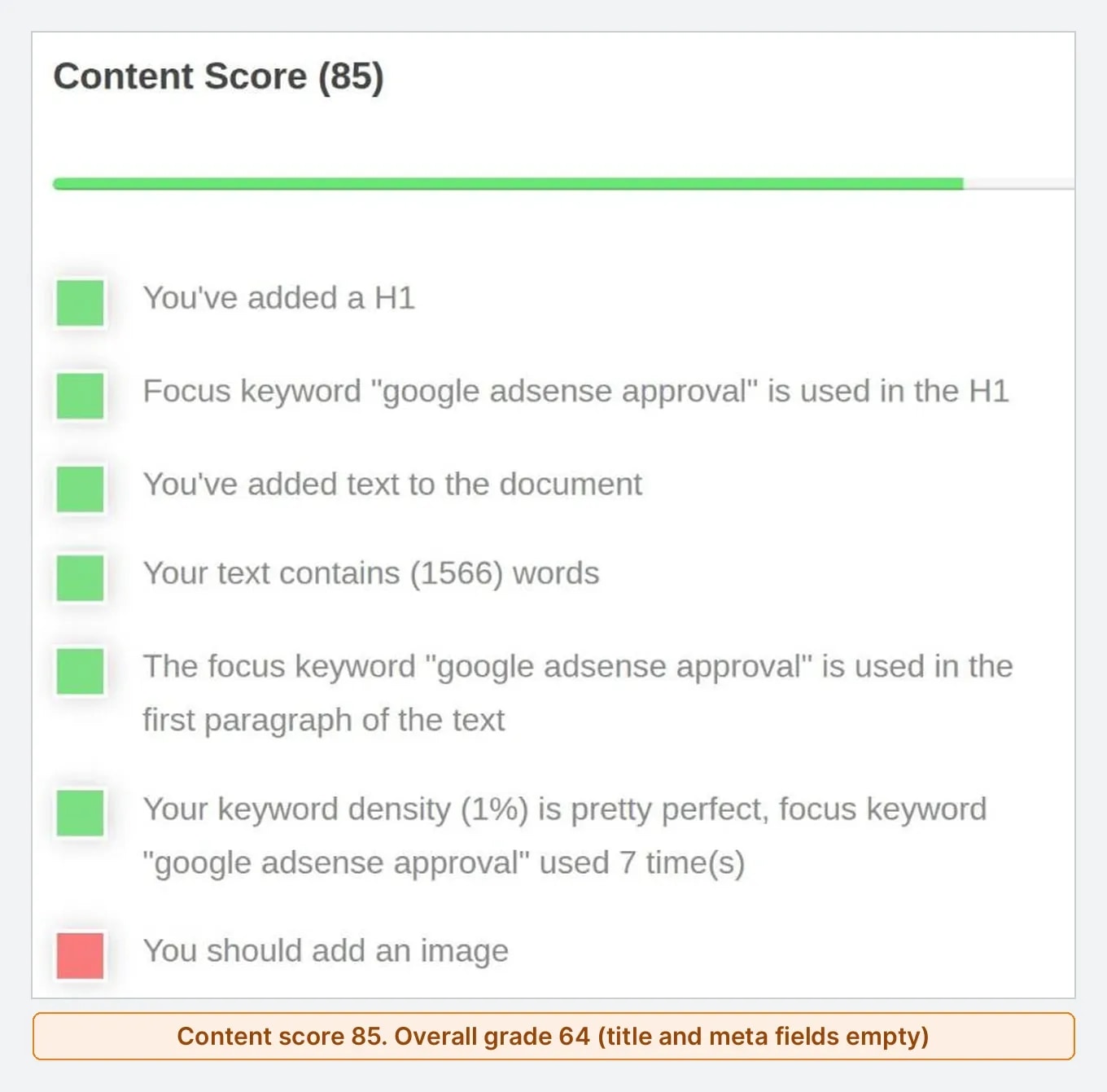
On the test article it gave an Optimization Grade of 64, Medium. That number hides the useful part. The Content Score was 85: it found the H1, the keyword in the H1 and first paragraph, 1,566 words, and a 1% keyword density used 7 times, which it called pretty perfect. The grade dropped because the Page Title and Meta Description scores were 0. Those are separate input fields, and a pasted draft leaves them empty. It also asked for an image and for the keyword in the image name and alt text.
Its Content Coverage and AI tabs sit behind an upgrade. Still, for a draft, the free editor is the most practical SEO content analysis tool in this list.
2. Rank Math SEO Analyzer: a URL report with technical tests
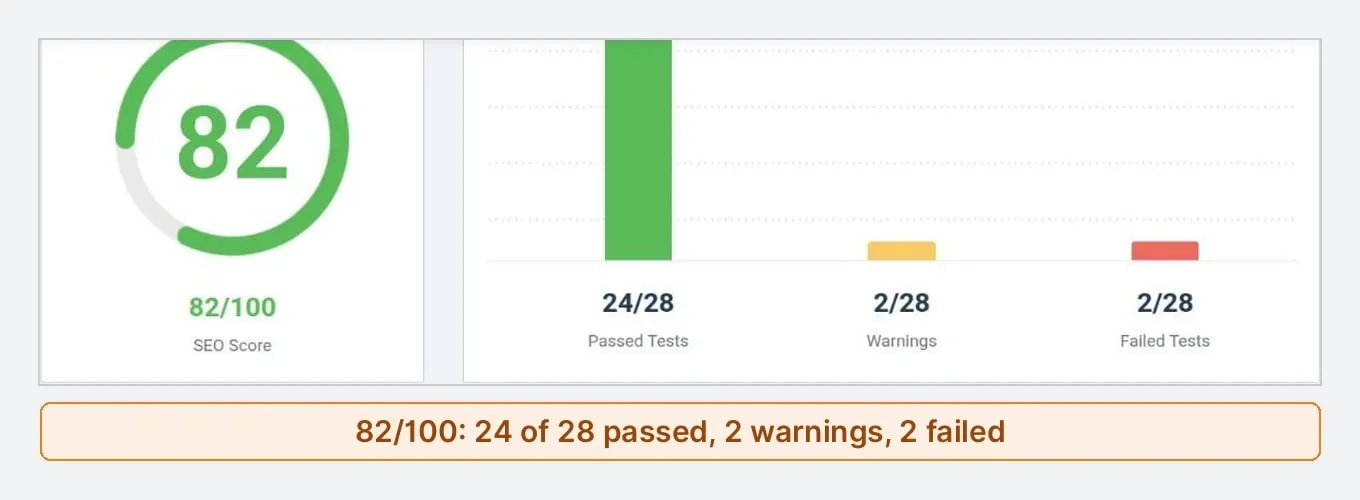
The Rank Math SEO Analyzer takes a URL and returns a report of 28 tests [3]. It needs no account. On the test article it scored 82/100, with 24 tests passed, 2 warnings and 2 failures.
The warnings were a link ratio it considered low, 28 internal links against 19 external links, and a response time of 0.92 seconds against its 0.8 second target. The failures were less useful. One said some JavaScript files did not seem minified, pointing at framework files the site serves as built. The other was a mobile speed test that simply reported "Test execution failed". It also listed the most common words on the page, which is a quick way to see whether your topic comes through.
As an SEO content checker for published pages, it is best at technical and metadata problems. However, do not treat a failed test as a content problem without reading what it actually flagged.
3. Seobility: the clearest on-page score
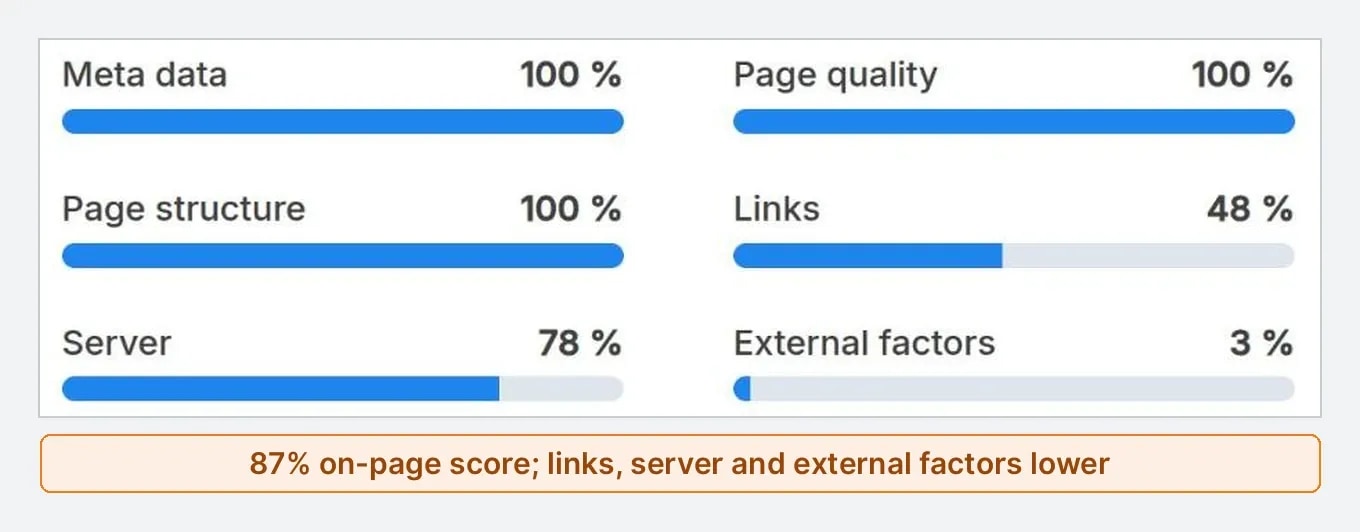
Seobility's free SEO Checker analyses one URL at a time, with three free checks a day [2]. On the test article it gave an 87% on-page score:
| Seobility area | Score |
|---|---|
| Meta data | 100% |
| Page quality | 100% |
| Page structure | 100% |
| Links | 48% |
| Server | 78% |
| External factors | 3% |
It counted 2,567 words on the full page, a 0.70 second response time and one warning. Its to-do list had only two tips: improve the response time and run a full website audit, which is part of its paid plan. Seobility showed a 14-day trial that then renews at 69.90 USD a month.
In standard mode there is no keyword field. So Seobility judges the page in general, not against the search you want to win.
4. Plerdy: a free checker behind an email form
Plerdy's page offers URL and text checks and promises a report in one to two minutes [4]. The analysis ran, but the results page asked for an email address and consent to marketing emails before showing anything. No email was entered, so this test has no score. If you do not mind the email, it is an option. Otherwise, the three tools above give an instant answer.
5. SEOptimer: a site audit, not an article check
SEOptimer is built as a website audit [5]. When the article URL was entered, it showed a message that the free plan's daily report limit had been reached, along with an audit for the anobee.com domain. That is useful for a quick site health view, but it does not check one article against its keyword.
Why the scores disagree
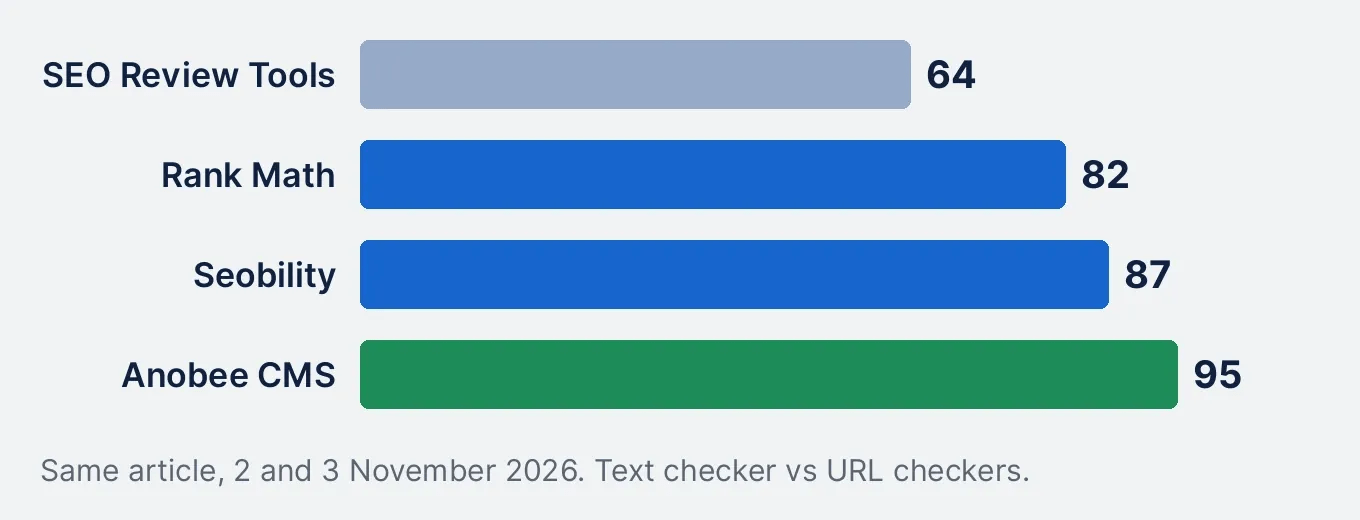
The same article scored 64, 82 and 87 on the same day. That does not mean two of the tools are wrong. Each SEO content checker measures different things:
- Text checkers grade only what you paste. SEO Review Tools could not see the published title and meta description, so it scored them zero.
- URL checkers grade the whole page. Navigation, footer links and server speed count, which is why Seobility found 2,567 words where the article body has about 1,566.
- Each tool weighs its checks differently. Seobility gave external factors 3% but still scored 87% overall.
For comparison, the CMS that publishes this site runs its own SEO analyzer. It scored the same article 95 out of 100 before publication. Four numbers, one article. So pick one tool for the job, and read its failed checks rather than its total.
What no SEO content checker caught
The test article scored between 64 and 95. On the same day, Google AdSense still listed the site it belongs to with the status "Low value content", a site-level judgement explained in the AdSense approval guide. A checker cannot see that kind of problem, because it is about whether the content as a whole is original and useful, not whether a keyword appears in an H1.
In practice, treat an SEO content checker as a spellcheck for SEO basics. To judge quality, read the page against the questions in Google's guidance [7], or work through Anobee's checklist for an SEO friendly article, which covers the manual checks a tool cannot run.
How to use an SEO content checker without keyword stuffing
- Fix the basics it finds. A missing title, H1, meta description or alt text is worth fixing every time.
- Read the failed check, not the score. A failure can be a framework file or a test that did not run.
- Do not chase density. If a sentence reads worse after you add the keyword, leave it out.
- Use one tool per job. A text checker for drafts, a URL checker after publishing.
- Recheck after real changes, not after every sentence.
When a paid content optimization tool makes sense
Paid tools such as Surfer, Clearscope, Frase and NEURONwriter do something the free checkers do not: they compare your draft with the pages already ranking and suggest missing topics and terms. That can help when you publish often in a competitive niche. Even so, like any SEO content checker, they cannot check facts or originality. Anobee compares what they cost and what each budget buys in the guide to the best AI SEO tools by budget.
Frequently Asked Questions
What is the best free SEO content checker?
For pasted text with a target keyword, SEO Review Tools' Content Analysis was the most useful free option in this test, because it works without an account and explains each check. For a published URL, Seobility gives a clear on-page score with three free checks a day, and the Rank Math SEO Analyzer adds technical tests.
What is a good SEO content score?
There is no universal good score, because every tool weighs different things. The same article scored 64, 82 and 87 in three tools on the same day. Use the list of failed checks, not the number: fix missing titles, headings or links, and ignore advice that would make the text worse to read.
Can an SEO content checker tell if my content is helpful?
No. The free checkers tested here count keywords, headings, links, length and technical signals. None judges whether the facts are right, whether the page adds something new, or whether it answers what the searcher wanted. Those are the questions Google's helpful content guidance asks.
Does keyword density still matter in an SEO content checker?
Most checkers still report it. SEO Review Tools called a 1% density pretty perfect in this test. Google says it has no preferred word count, so use density only to catch obvious stuffing or a keyword you forgot to mention, not as a target.
Sources and References
Was this guide helpful?
Your answer helps Anobee improve future updates.

Written by
Bibek Thapa
AI-Powered Digital Growth Strategist
Bibek Thapa works across AI workflows, SEO, AI search optimization, content strategy, website growth, and productivity systems at Anobee.
- AI workflows
- Digital growth
- SEO
- GEO
- AEO
- Content strategy
- Website growth