SEO & AI Search
Does Bounce Rate Affect SEO? What Google Says, With Real GA4 Data
By Bibek Thapa · Updated · 13 min read
Quick Answer
No. Bounce rate does not affect SEO directly. It is not in Google's published list of ranking systems, and it comes from analytics software on your own site, which Google Search does not need. Google does use aggregated, anonymized interaction data from its own results. A high bounce rate can still point to a real problem worth fixing.

Table of ContentsOn this page
- What Google's documentation says
- What Google does use: interaction data from its own results
- What GA4's bounce rate actually measures
- What is a good bounce rate? One site's real numbers
- When a high bounce rate is exactly right
- When a high bounce rate is worth investigating
- Check the number before you fix anything
- Five causes of a high bounce rate, in the order to fix them
- What not to do
- How to tell whether a fix worked
- Bottom line
- Frequently Asked Questions
- Sources and References
Key Takeaways
- Bounce rate is absent from Google's published guide to its ranking systems.
- Google says it uses aggregated, anonymized interaction data from Search, not your analytics.
- In GA4, bounce rate is the share of sessions that were not engaged.
- On one site in the same 28 days, organic search bounced 26.87% and direct traffic 84.43%.
- A good bounce rate depends on the page's job and the traffic source, not a benchmark.
- Fix intent, speed, interruptions, next steps and mobile layout, then compare against the page's own history.
No, bounce rate does not affect SEO directly. It is not in Google's published list of ranking systems, and it comes from analytics software you install on your own site, which Google Search does not need in order to rank you. Google does use interaction data, but from its own search results, aggregated and anonymized.
The more useful questions come after that: what your bounce rate actually measures, why one site can show a "good" and a "bad" bounce rate in the same month, and which causes are worth fixing.
What Google's documentation says
Google maintains a public guide to its ranking systems. It names them: BERT, crisis information systems, deduplication systems, the exact match domain system, freshness systems, link analysis systems and PageRank, local news systems, MUM, neural matching, original content systems, removal-based demotion systems, the passage ranking system, RankBrain, reliable information systems, the reviews system, the site diversity system and spam detection systems. It also keeps a list of retired systems "for historical purposes" [1].
Bounce rate is not among them. Neither is engagement rate, time on page, session duration or any other number that comes out of an analytics product.
Google does name things that are not ranking factors when it wants to. Its SEO Starter Guide says Google Search does not use the keywords meta tag, that the length of content alone does not matter for ranking, and, on E-E-A-T, "No, it's not" a ranking factor [2]. So the guide to ranking systems is the place to look, and bounce rate is not in it.
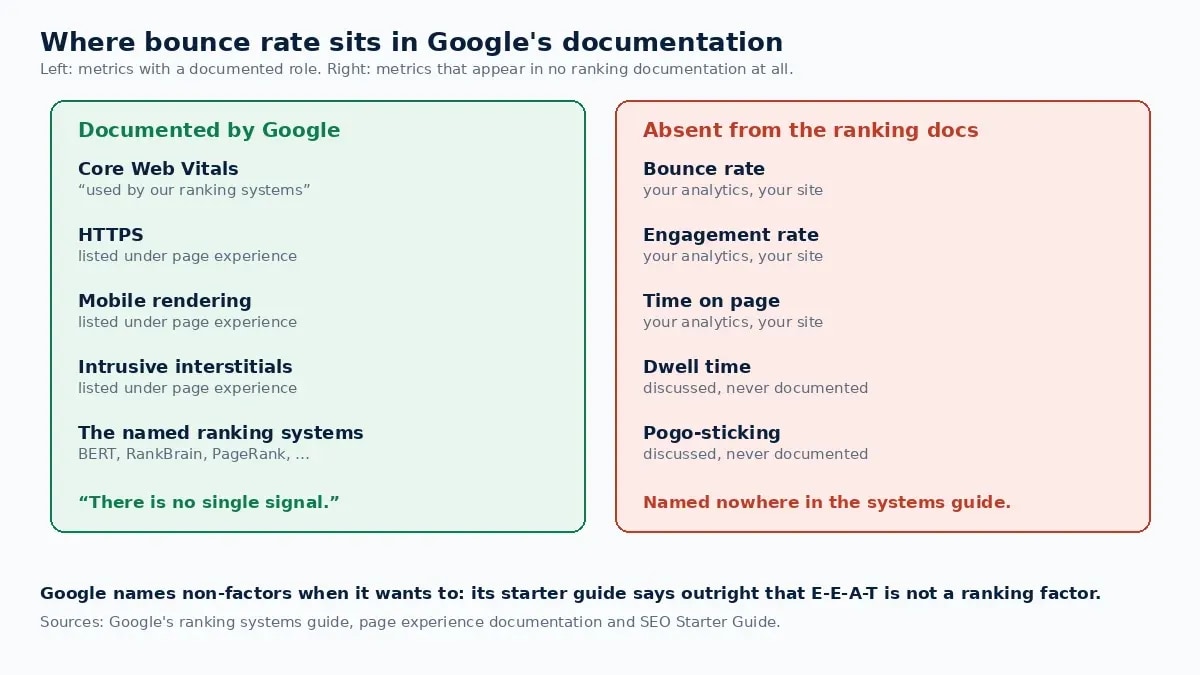
There is also a practical argument. Google Analytics is software a site owner chooses to install. Many sites run a different tool or none at all, and they are ranked by the same systems. A ranking system cannot depend on a number that exists for only some of the pages it ranks.
Googlers have said the same thing in videos and podcasts over the years. Those statements are real, but they are harder to cite than documentation. If you need something to quote, use the ranking systems guide and the starter guide.
What Google does use: interaction data from its own results
Google does look at how people interact with search results, and many articles on this topic skip that part. Its own explanation of how ranking works says: "We also use aggregated and anonymized interaction data to assess whether search results are relevant to queries" [3]. Google adds that it turns that data into signals for its machine-learned systems [3].
That data comes from Google Search itself: which result people choose and what they do on the results page. It is not your GA4 bounce rate. Google does not need your analytics to see it, and nothing in its documentation connects the two.
| Term | Where it is measured | What Google documents |
|---|---|---|
| Bounce rate | Your analytics, on your site | Not in the ranking systems guide [1] |
| Engagement rate | Your analytics, on your site | Not in the ranking systems guide [1] |
| Interaction data | Google Search results | Used in aggregated, anonymized form to judge relevance [3] |
| Dwell time and pogo-sticking | Between a click and a return to the results | Not named as systems; widely discussed, never published |
| Core Web Vitals | Field data from real Chrome users | Used by ranking systems, with no guarantee attached [5] |
The practical point is the same either way. If people land on your page and go straight back to look for a better answer, that is a problem for them before it is a problem for your rankings. Your bounce rate is one rough way to spot it.
What GA4's bounce rate actually measures
Half the confusion is about the definition, and the definition changed.
In Universal Analytics, a bounce was any single-page session. Someone who read a long guide for twelve minutes and left counted the same as someone who arrived by mistake and left in two seconds.
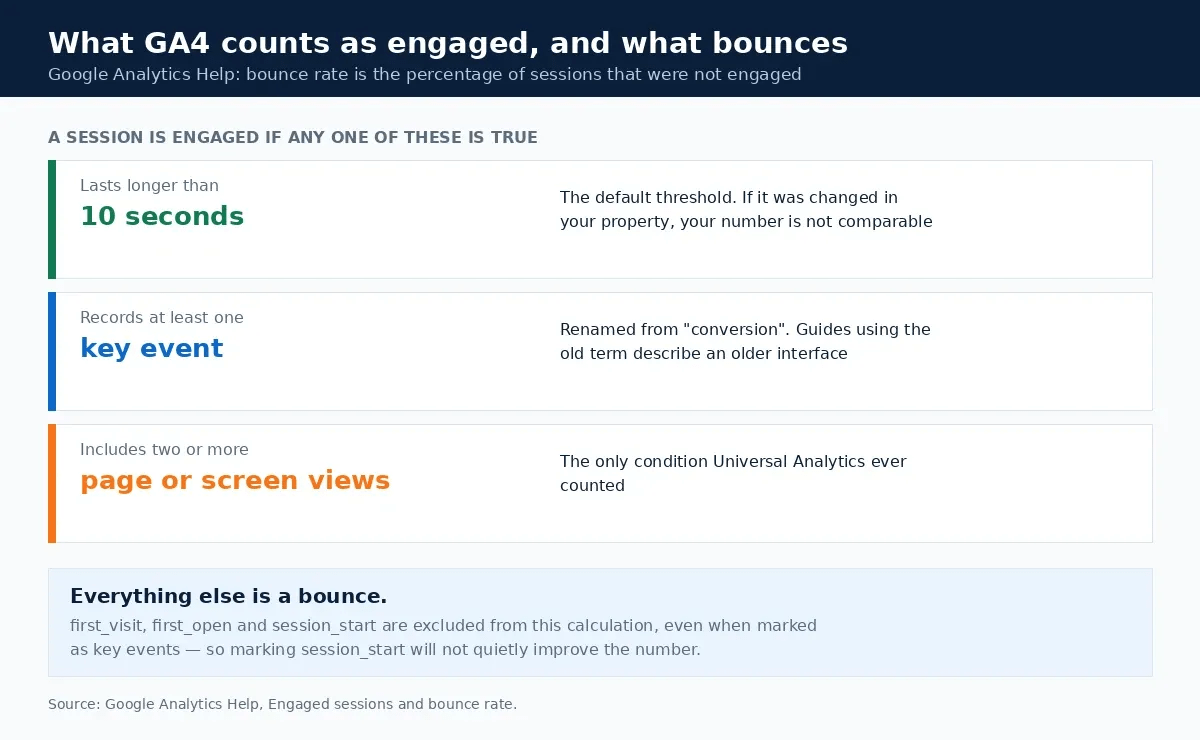
GA4 reversed the logic. Google defines an engaged session as one that "Lasts longer than 10 seconds", "Has a key event", or "Has 2 or more screen or page views" [4]. Engagement rate is the percentage of engaged sessions, and bounce rate is the percentage of sessions that were not engaged [4]. The two always add up to 100%.
That has three consequences:
- A long single-page read is no longer a bounce. Anyone who stays longer than ten seconds counts as engaged.
- A fast, successful answer still is. Someone who reads a two-line definition in eight seconds and leaves happy counts as a bounce.
- Some events never count. Google excludes first_visit, first_open and session_start from engaged sessions, even when they are marked as key events [4].
So a GA4 bounce rate is not a satisfaction score. It is the share of sessions that failed a ten-second test. Our guide to GA4 engaged sessions covers the definition in more detail.
What is a good bounce rate? One site's real numbers
Searchers ask whether 42%, 30% or 20% is a good bounce rate. The honest answer is that it depends on the page and on where the visitor came from. Anobee's own GA4 property shows why.
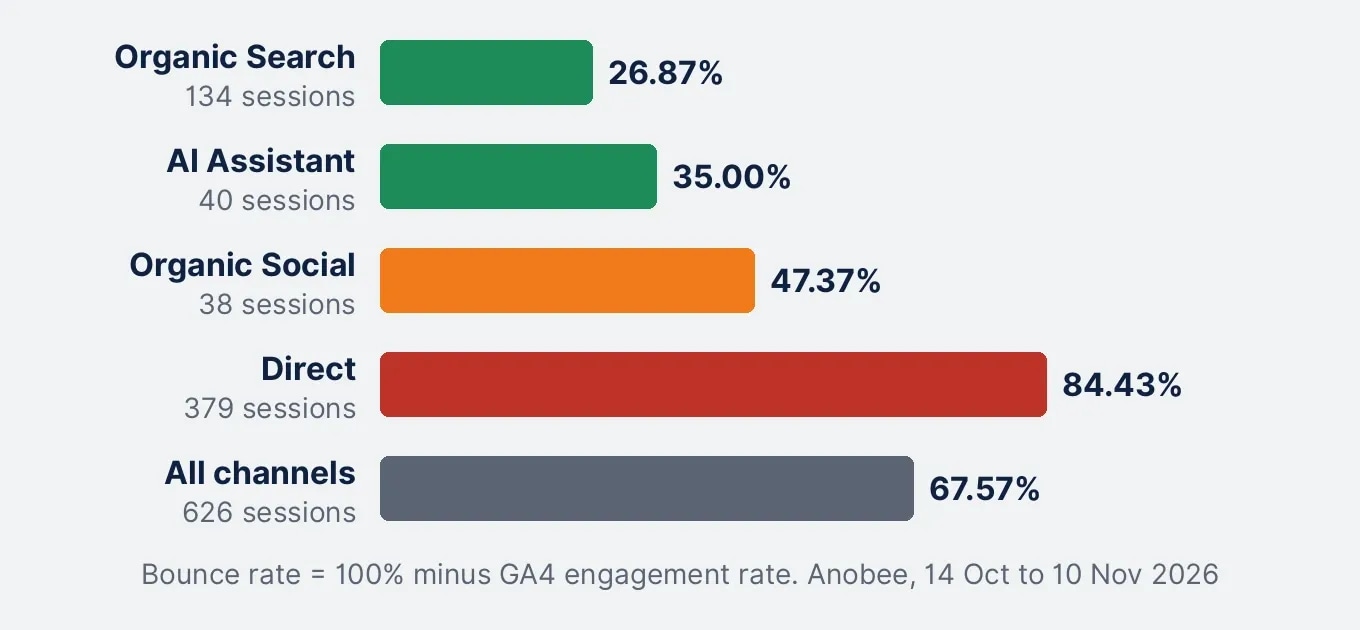
These are the Traffic acquisition figures for Anobee from 14 October to 10 November 2026. GA4 shows engagement rate; the bounce rate column is 100% minus that figure.
| Channel | Sessions | Engagement rate | Bounce rate | Average engagement time |
|---|---|---|---|---|
| Organic Search | 134 | 73.13% | 26.87% | 46s |
| AI Assistant | 40 | 65% | 35% | 32s |
| Organic Social | 38 | 52.63% | 47.37% | 15s |
| Direct | 379 | 15.57% | 84.43% | 7s |
| All channels | 626 | 32.43% | 67.57% | 17s |
Paid Search (19 sessions), Referral (12) and Unassigned (4) are not shown but are included in the total.
Three things in that table matter.
First, the sitewide figure of 67.57% describes no real visitor. It is an average of organic visitors who mostly stayed and direct visitors who mostly did not. Anyone judging the site on that one number would draw the wrong conclusion.
Second, organic search, the traffic SEO is supposed to bring, had the lowest bounce rate on the site. If your question is whether search visitors find what they came for, look at that row, not the total.
Third, the direct row is worth investigating rather than fixing. GA4 defines Direct as visits that arrive through a saved link or a typed URL [6]. On a small site, that bucket can include the owner's own visits and traffic GA4 could not attribute. We have not diagnosed Anobee's direct traffic, so the right next step is a check, not a content change.
So, is a 42% bounce rate good? For a long guide from organic search, it would be higher than this site's organic figure of 26.87%, but still well below the sitewide total. For a checkout step, it would be high. A benchmark from another site cannot tell you which, because their traffic mix and page types are not yours.
When a high bounce rate is exactly right
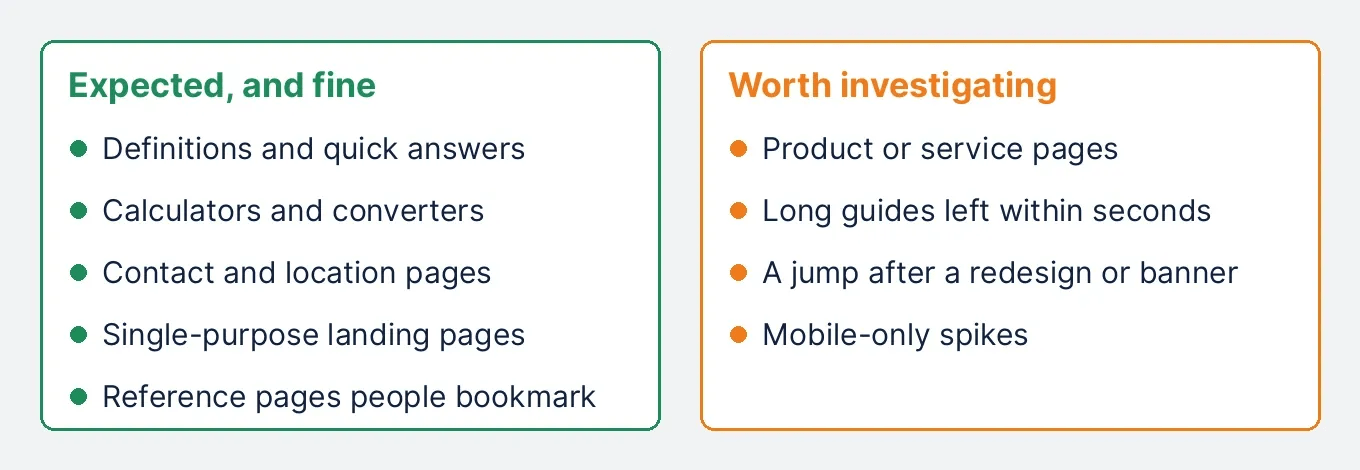
Some pages should have a high bounce rate, and a low one would be the warning sign:
- Definitions and quick answers. The visit ends when the question is answered.
- Calculators and converters. Someone runs the numbers and leaves.
- Contact and location pages. They wanted the phone number.
- Single-purpose landing pages. There is nothing else to click by design.
- Reference pages people bookmark. Short repeat visits are the point.
Measuring these against a store or a long guide creates a "problem" that is really the page doing its job.
When a high bounce rate is worth investigating
The number deserves attention when it contradicts the page's purpose:
- Product or service pages where visitors leave before the next step.
- Long guides that most visitors leave within seconds, which suggests the page is not what the query promised.
- Any page whose number jumped after a redesign, a template change or a new consent banner.
- Mobile-only spikes, which usually point to layout, speed or a pop-up.
In each case the number is a symptom. The cause is somewhere below.
Check the number before you fix anything
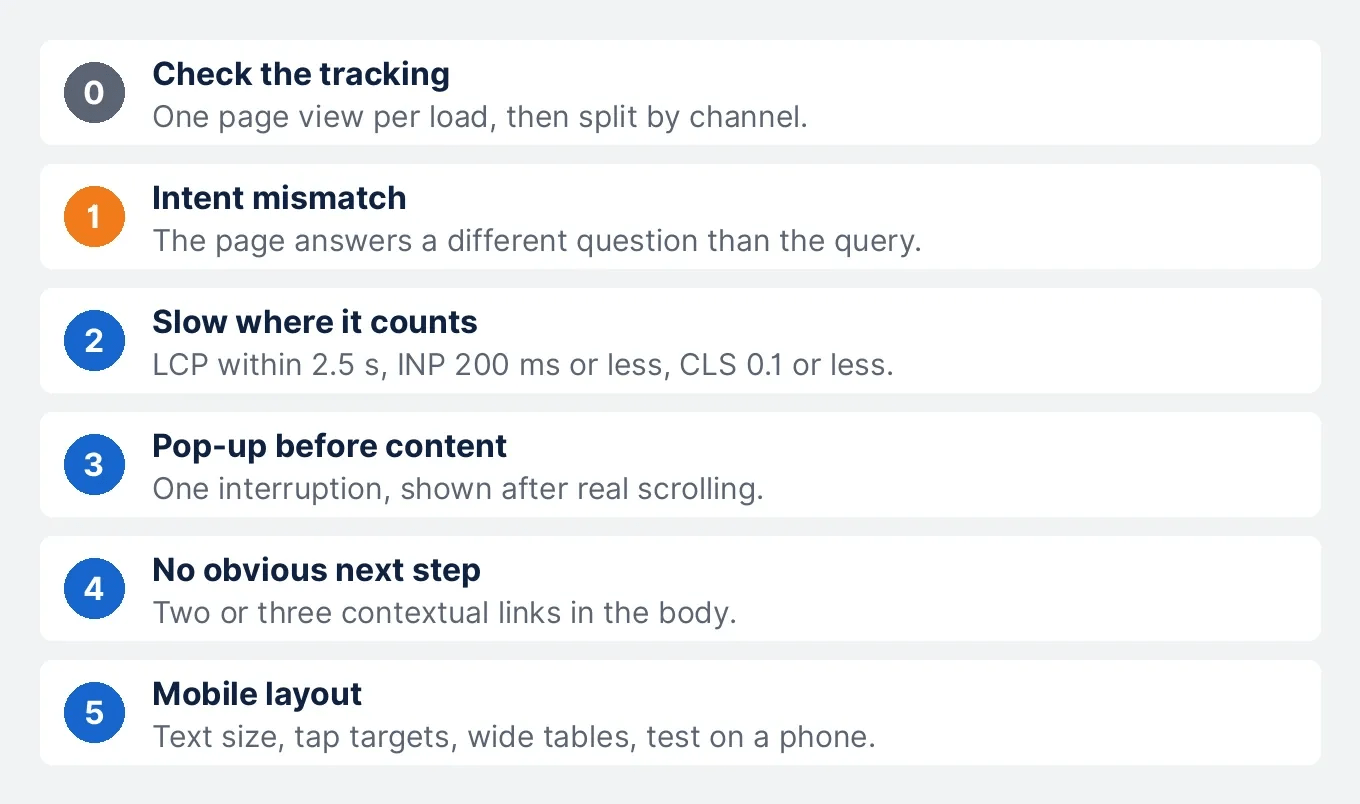
Two measurement faults produce alarming figures that no content change will fix.
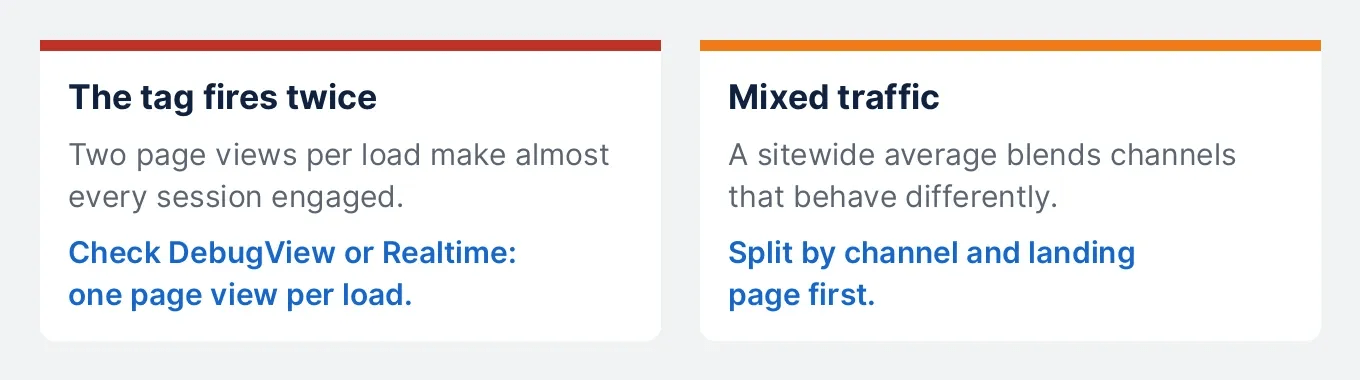
- The tag fires twice. If the GA4 tag loads twice per page, every session records two page views and counts as engaged. Bounce rate drops sharply without any change in behaviour. Check in DebugView or the Realtime report that each page load sends one page view.
- Mixed traffic. As the table above shows, a sitewide average blends channels that behave very differently. Split by channel and by landing page before deciding anything.
A sudden jump or drop with no change on the page is usually a measurement event, not a content one. Rule it out first, or every fix below gets credited or blamed for it.
Five causes of a high bounce rate, in the order to fix them
1. The page answers a different question than the query
This is the most common cause. Someone searches a specific question, lands on a page about the general subject, and leaves because the answer is not visible.
The check is simple. Open Search Console, list the queries that bring impressions to the page, and read the first screen as if you had just typed each one. If the answer is not there, you have an intent problem. Google's guidance asks whether content "provides substantial value when compared to other pages in search results" [7]. The fix is usually to answer the question in the opening paragraph, then expand. Our search intent guide shows how to compare a page with the live results.
2. The page is slow where it counts
A visitor who leaves before the content appears never had a chance to engage. The published targets are a Largest Contentful Paint within 2.5 seconds, an Interaction to Next Paint of 200 milliseconds or less, and a Cumulative Layout Shift of 0.1 or less, measured at the 75th percentile of page loads [8].
On a content page, the largest element is usually the main image, so image delivery matters most. The image optimization guide covers the steps. Aim for "good", not a perfect score: Google says chasing a perfect score just for SEO "may not be the best use of your time" [5].
3. A pop-up arrives before the content
An email form that covers the article before anyone has read a sentence costs more visitors than it gains. Google's page experience questions include whether pages avoid "intrusive interstitials" and whether visitors can easily "distinguish the main content from other content" [5].
The practical rule is one interruption, shown late. Trigger it after the reader has scrolled well into the page, not on a timer of a few seconds. A pop-up, a sticky bar and a sidebar widget together are three reasons to leave.
4. There is nowhere obvious to go next
A reader who finishes and sees no relevant next step leaves, which is reasonable. Contextual links inside the body tend to work better than a related-posts block at the bottom, because they appear when the related question comes up. Two or three genuine links per article is enough, each with anchor text that describes the destination.
5. The mobile layout gets in the way
Mobile problems are invisible on a desktop screen. Watch for small body text, tap targets that are hard to hit, tables that force sideways scrolling, and a large image that pushes the first paragraph below the fold. Test on a real phone, not only a resized browser window. A session recording tool such as Microsoft Clarity shows where mobile visitors give up.
What not to do
- Chase a target percentage. No bounce rate buys a ranking, and Google says page experience has "no single signal" [5].
- Split one article across several pages. It raises page views and makes the reading experience worse.
- Fire a timed event to force engagement. It changes the number and nothing else.
- Compare Universal Analytics and GA4 figures. The definitions are different [4].
- Use someone else's benchmark. Different content, traffic mixes and settings make cross-site comparisons meaningless.
- Read the sitewide average alone. It mixes channels and page types that should behave differently.
How to tell whether a fix worked
Measure the page against its own history. Take four weeks before the change and four weeks after, and filter to the same channel, usually Organic Search.
Read three things together: engagement rate, average engagement time, and whether Search Console impressions and clicks moved in the same direction. If engagement rises while clicks stay flat, you improved the experience for the visitors you already had. If both rise, the intent fix was probably the one that mattered. Our Search Console setup guide explains how to read clicks and impressions.
Bottom line
Bounce rate does not affect SEO directly. It is not in Google's list of ranking systems, it comes from software many sites do not run, and the interaction data Google says it uses comes from its own results, not from your analytics.
The metric is still useful as a pointer. Check the tracking, split it by channel and page, then work the five causes in order: intent, speed, interruptions, next steps and mobile layout. Each fix is worth making whether or not the percentage moves.
Frequently Asked Questions
Is bounce rate a Google ranking factor?
No. Google publishes a guide to its ranking systems, and bounce rate does not appear in it. Bounce rate is calculated by analytics software on your own site. Google says it uses aggregated, anonymized interaction data from its own search results, which is a different thing.
Is a 42% bounce rate good?
It depends on the page and the traffic source. A 42% bounce rate is fine for a guide and high for a checkout step. On Anobee, organic search bounced 26.87% and direct traffic 84.43% over the same 28 days, so a single sitewide figure hides more than it shows.
What is the difference between engagement rate and bounce rate in GA4?
They are two sides of the same number. GA4 counts a session as engaged if it lasts longer than 10 seconds, has a key event, or has two or more page or screen views. Engagement rate is the share of engaged sessions, and bounce rate is the share that were not engaged. Together they add up to 100%.
What is a good bounce rate in GA4?
One that fits the page's job. Definitions, calculators and contact pages should bounce a lot, because the visit ends when the task is done. Product pages and multi-step guides should not. Compare a page with its own history and its traffic source rather than with a published benchmark.
How do you reduce a high bounce rate?
Check the tracking first, then work five causes in order: whether the page answers the query that found it, whether it loads fast enough, whether a pop-up arrives before the content, whether there is an obvious next step, and whether the mobile layout works. Each is worth fixing whether or not the percentage moves.
What should I track instead of bounce rate?
Track the outcome the page exists for, plus Search Console data for the queries it attracts. Engagement rate and average engagement time are useful context in GA4, split by channel, and a session recording tool such as Microsoft Clarity shows why people leave.
Sources and References
- Google Search Central: A guide to Google Search ranking systems ↩
- Google Search Central: SEO Starter Guide ↩
- Google: How Search works, ranking results ↩
- Google Analytics Help: [GA4] Engagement rate and bounce rate ↩
- Google Search Central: Understanding Google page experience ↩
- Google Analytics Help: [GA4] Default channel group ↩
- Google Search Central: Creating helpful, reliable, people-first content ↩
- web.dev: Web Vitals ↩
Was this guide helpful?
Your answer helps Anobee improve future updates.

Written by
Bibek Thapa
AI-Powered Digital Growth Strategist
Bibek Thapa works across AI workflows, SEO, AI search optimization, content strategy, website growth, and productivity systems at Anobee.
- AI workflows
- Digital growth
- SEO
- GEO
- AEO
- Content strategy
- Website growth