Freelancing & Online Business
How to Buy a Domain: 7 Steps, and the Renewal Trap Nobody Mentions
By Bibek Thapa · Updated · 14 min read
Quick Answer
Buying a domain takes about five minutes. Search for the name at a registrar, check the renewal price rather than the first-year offer, add privacy if it is not already free, complete checkout, then action the verification email. The first-year price is marketing. The renewal price is what you will actually pay every year after that.
Table of ContentsOn this page
Key Takeaways
- Cloudflare Registrar now registers new domains directly and sells at cost, not only transfers.
- Cloudflare states customers pay only what registries and ICANN charge, with no markup added.
- Namecheap lists .com at about $11.28 for the first year and $14.98 on renewal, with free lifetime Whois privacy.
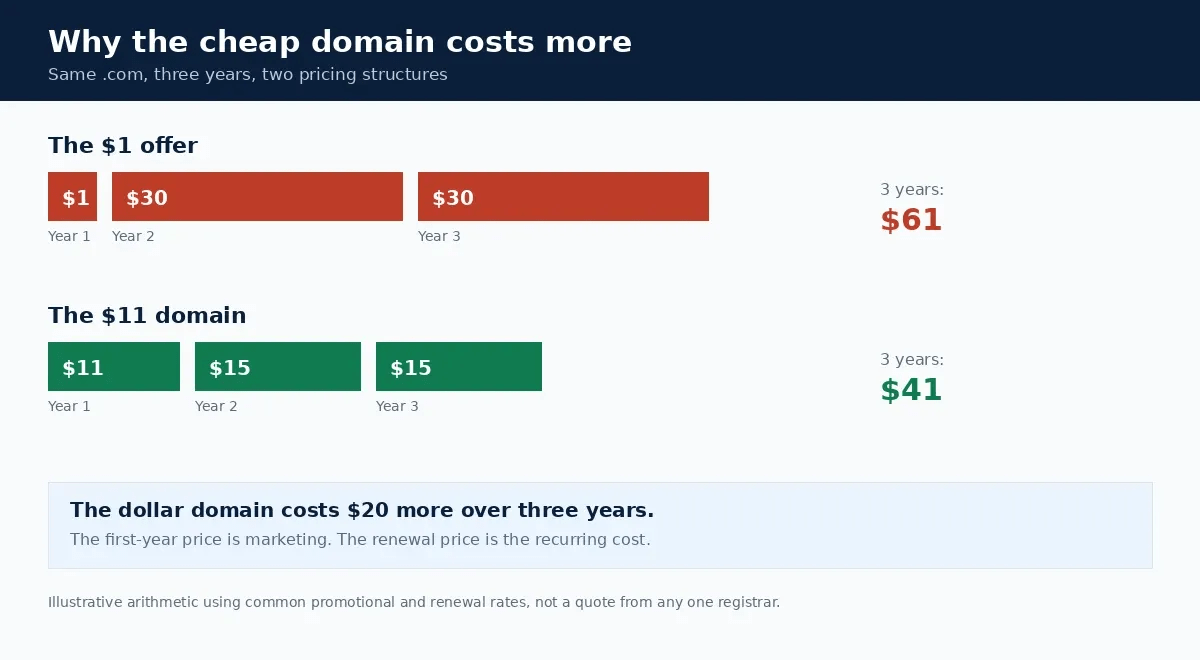
- Compare the renewal price, not the first-year offer. A $1 domain renewing at $30 costs more over three years.
- Action the verification email. An unconfirmed registrant contact can get the domain suspended.
- If your name is taken, check whether it is parked, in use, or listed for sale before paying a broker.
Most advice on how to buy a domain gets the mechanics right and the money wrong. This guide had the opposite problem: one recommendation was steering readers away from the cheapest option available to them.
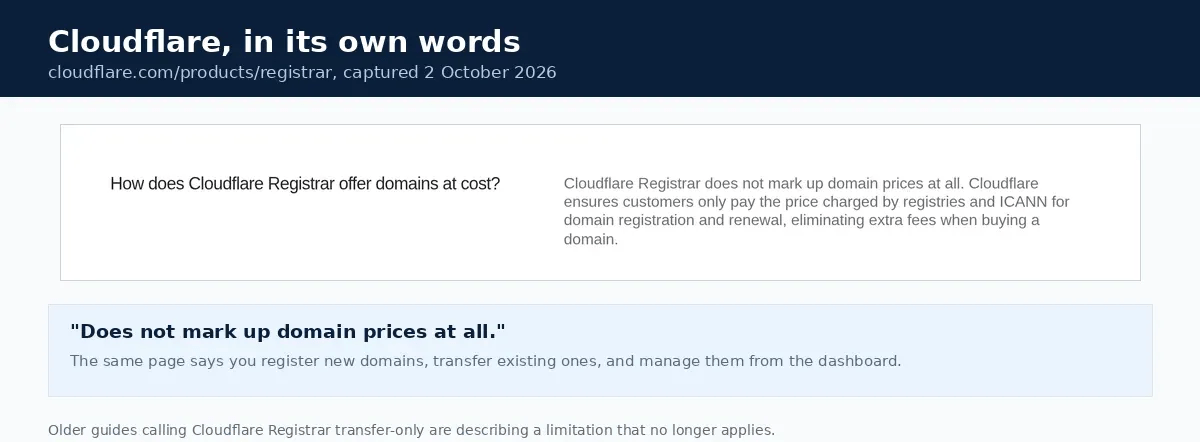
It said of Cloudflare Registrar: "you can't register new domains directly with Cloudflare (as of 2025, they're rolling out new registration); primarily it's best for transfers." That is no longer true. Cloudflare's own page is titled "Search and Buy Domains at Cost" and states that you "register new domains, transfer existing ones, and manage your portfolio from the Cloudflare dashboard" [1].
That matters because of what Cloudflare charges. It says customers "only pay the price charged by registries and ICANN for domain registration and renewal, eliminating extra fees" [1]. For anyone optimising for long-term cost, a transfer-only caveat was the reason to skip it.
Two smaller fixes. A section headed "Best Domain Registrars Compared (2025)" has lost its year, because the comparison is not annual and a stale date undercuts it. And a claim that one named registrar's renewals are "among the highest in the industry" has been softened to the principle behind it, because that pricing could not be verified from a primary source during this update.
What you are actually buying
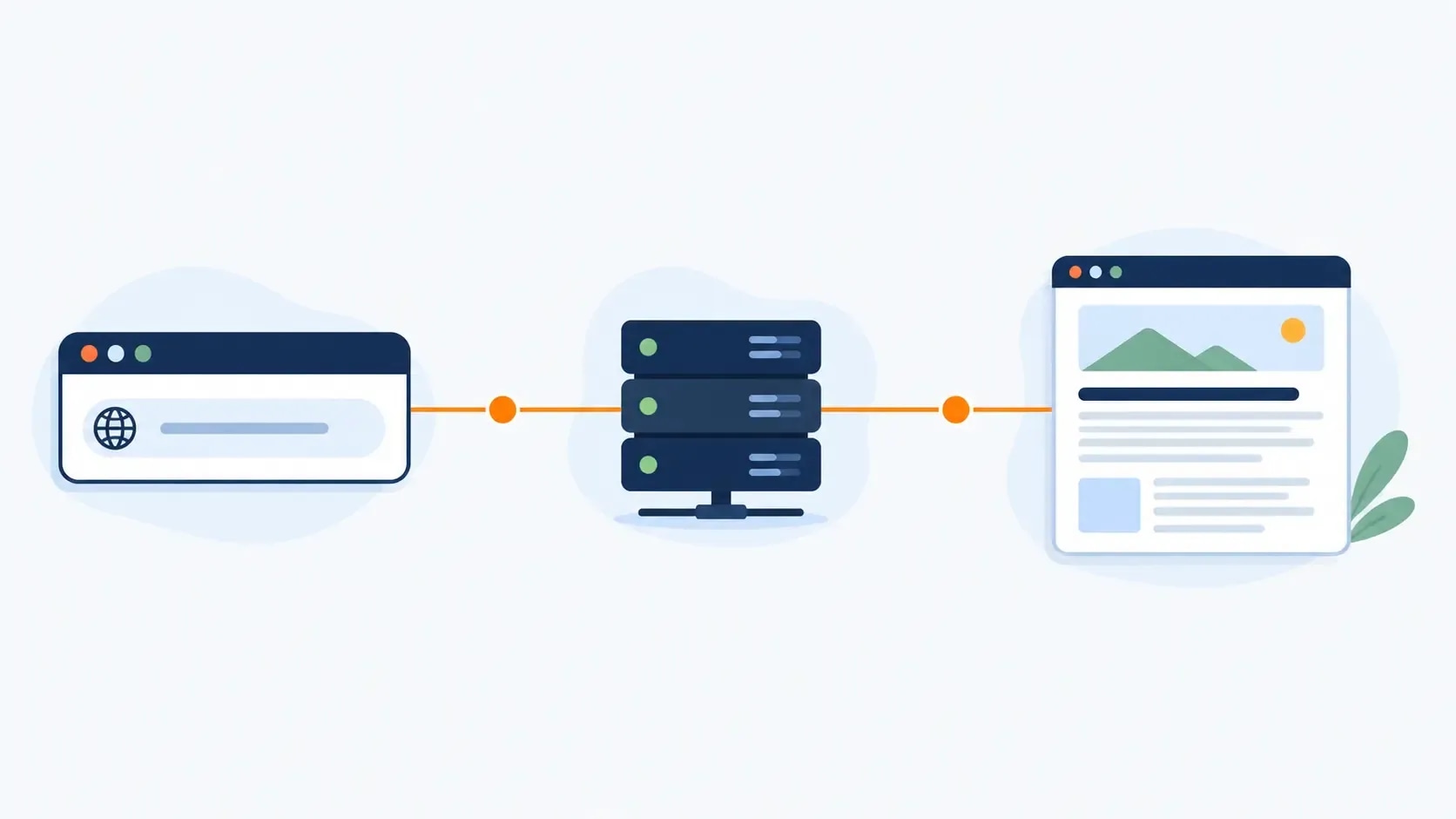
Before working through how to buy a domain, it helps to know what the payment covers. A domain is the address people type to reach your site, and you do not own it outright. You hold the exclusive right to use it for as long as you keep paying the annual registration.
ICANN oversees the system, and every domain must be registered through an ICANN-accredited registrar. The registrar is the shop. The registry runs the extension. That split is why a .com costs roughly the same wherever you buy it, and why the difference between registrars is the markup, the renewal, and what they try to sell you at checkout.
Domain and hosting are not the same purchase
The domain is the address. Hosting is the building. You can buy them separately, and plenty of people do, though most hosting plans include a free domain for the first year. If you are buying both at once, the WordPress setup guide covers how they connect.
Choosing the extension
.com is still the default. People type it without thinking, and that alone is worth something.
Country codes such as .com.np, .co.uk or .in make sense when your audience is local and you want to signal that.
Newer extensions like .blog, .store or .tech are legitimate and often available when the .com is not. One caution: some carry renewals well above .com, so check the second-year price before you fall in love with the name.
What makes a name worth keeping
- Short beats clever. Under 15 characters if you can.
- Say it out loud. If you have to spell it every time, it is the wrong name.
- Skip hyphens and numbers. Both get lost in conversation.
- Brand over keyword. Exact-match keyword domains stopped carrying a ranking advantage long ago, and they age badly.
- Check the name is free elsewhere too. A domain is little use if the matching social handles are all taken.
How to buy a domain, step by step
Step 1: Search for the name
Go to a registrar and type the name into the search box. You will get availability plus a wall of suggested alternatives, most of which exist to sell you something.
Ignore the upsells for now. You are only establishing whether the name is free.
Step 2: Choose the registrar on renewal price
Any ICANN-accredited registrar sells you the same underlying registration. The differences are price, renewal rate, whether privacy is included, and how hard they push extras at checkout.
| Registrar | Approximate .com cost | Privacy | Notes |
|---|---|---|---|
| Cloudflare | At cost, no markup [1] | Included | Registers new domains and transfers. No promotional rate, so no renewal jump |
| Namecheap | About $11.28 first year, $14.98 renewal [3] | Free for life [2] | Transparent pricing, light on upselling |
| Your host | Often free for year one | Varies | Convenient if you are buying hosting anyway. Check the year-two price |
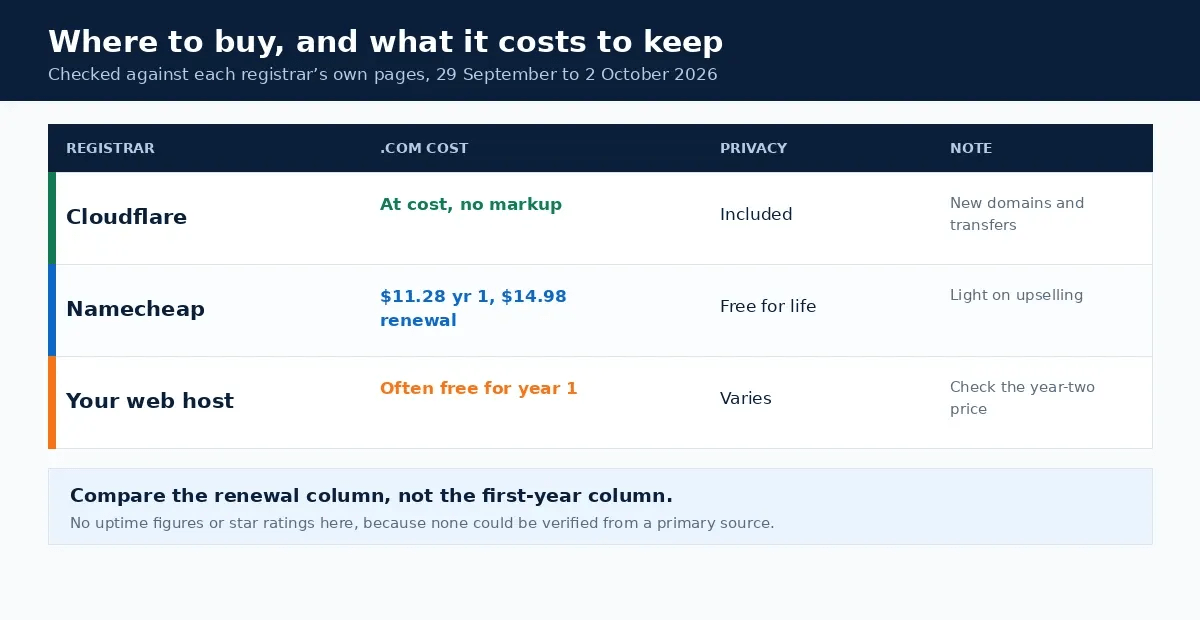
The rule that survives any price change: a $1 first-year domain that renews at $30 is a worse deal than an $11 domain that renews at $15. Over three years the first costs $61 and the second costs $41.
Step 3: Review the details before checkout
Check the spelling character by character. Check the extension is the one you meant. Check the registration length, because some carts default to multiple years.
Step 4: Add privacy, if it is not already free
When you register, ICANN requires the registrar to collect your name, address, email and phone. That data goes into the public Whois record, and privacy replaces it with the registrar's details.
Namecheap includes this free for life on new registrations and transfers [2], and Cloudflare includes it as well. If a registrar wants $5 to $15 a year for it, that is a reason to compare rather than an unavoidable cost.
Step 5: Choose the registration period
One year is fine and keeps you flexible. Registering for two or three years reduces the chance of losing the name to a forgotten renewal, which is a real risk rather than a theoretical one.
Whatever you choose, turn on auto-renew and make sure the card on file is one that will still be valid next year.
Step 6: Complete checkout and decline the extras
Expect offers for hosting, SSL, email, website builders and SEO services. You need none of them to own a domain. SSL comes free with almost every host. Email can wait until you have a site.
Step 7: Action the verification email
After purchase the registrar sends a verification email to the address you registered with. Click the link.
This is not a formality. Registrars are required to verify the registrant's contact details, and an address that is never confirmed can result in the domain being suspended, which takes the site offline until it is sorted out.
Once verified, you get the control panel where DNS records, redirects and transfers live.
How to buy a domain that is already taken
This is the situation most guides skip, and it is where a lot of searches actually end up.
First, look at what is there. A parked page full of ads usually means a reseller holds it and wants to be paid. A working site means it is not realistically for sale. A blank page or an error could be either.
Then weigh it honestly. Aftermarket names start around $100 and climb into the thousands. A premium price only makes sense if the name is genuinely better, rather than merely the one you thought of first. A fresh, well-chosen name registered today for $12 will usually serve a new project better than a $5,000 purchase.
If you do want to pursue it, registrar marketplaces list many taken names for sale, and a Whois lookup shows whether the owner's contact details are public.
What a domain costs over time
A .com runs roughly $9 to $15 a year at renewal with a mainstream registrar. Cloudflare's at-cost model sits at the registry price [1].
The costs people meet later, once they know how to buy a domain and have done it once:
- The renewal jump, which is the main one. Check it before buying, not twelve months later.
- Privacy, if your registrar charges for it. Free at Namecheap [2] and Cloudflare.
- Premium extensions, where some new TLDs renew far above .com.
- Transfer fees, usually the cost of one year added to your registration.
Renewal, and what happens if you forget
Miss the renewal and the domain does not vanish immediately. It typically enters a grace period where you can still renew at the normal price. After that comes a redemption period where recovery costs substantially more, and only then does it become available to anyone.
The practical protection is three things: auto-renew on, a payment method that will not expire, and a renewal reminder in your own calendar rather than only in the registrar's email.
Common mistakes
- Buying on the first-year price. The renewal is the recurring cost.
- Letting the registrar hold everything. Domain, hosting and email with one provider makes leaving harder.
- Skipping the verification email. It can suspend the domain.
- Choosing a name you cannot say. If it needs spelling out, it will be mistyped forever.
- Paying aftermarket prices for a first project. A different name costs $12.
- Forgetting auto-renew. The most common way people lose a domain they still want.
Bottom line
Knowing how to buy a domain is a five-minute skill wrapped in a pricing structure designed to be misread. Pick a name you can say out loud, buy it from a registrar whose renewal price you have actually looked at, take the free privacy if it is offered, and action the verification email. Then turn on auto-renew and stop thinking about it for a year.
Frequently Asked Questions
How much does a domain name cost?
A .com is usually $9 to $15 a year at renewal with a mainstream registrar. Namecheap lists about $11.28 for the first year and $14.98 on renewal. Cloudflare Registrar sells at cost, meaning you pay only what the registry and ICANN charge. First-year offers of $1 or less exist, but the renewal is the number that matters.
Can you register a new domain with Cloudflare?
Yes. Cloudflare Registrar handles new registrations as well as transfers, and says you register, transfer and manage domains from the Cloudflare dashboard. Older guides describing it as transfer-only are out of date. It sells at cost, so there is no promotional first-year rate and no inflated renewal.
Which domain extension should I choose?
Start with .com if it is available, because it still carries the most recognition and people default to typing it. A country code such as .com.np makes sense when your audience is local. New extensions like .blog or .store are fine when the name is strong, but check the renewal price, since some carry much higher renewals than .com.
Do I need to pay for domain privacy?
Often not. Namecheap includes Whois privacy free for life on new registrations and transfers, and Cloudflare includes it too. If a registrar charges $5 to $15 a year for it, that is a reason to compare rather than a necessary cost. Without privacy, your name, address, email and phone sit in the public Whois record.
What happens if my chosen domain is already taken?
Look at what the current owner is doing with it first. A parked page with ads suggests a reseller, while a working site suggests it is not for sale at any sensible price. Many taken names are available through a registrar's marketplace, and aftermarket prices start around $100 and climb steeply. A different name you can register today is usually the better business decision.
Sources and References
Was this guide helpful?
Your answer helps Anobee improve future updates.

Written by
Bibek Thapa
AI-Powered Digital Growth Strategist
Bibek Thapa works across AI workflows, SEO, AI search optimization, content strategy, website growth, and productivity systems at Anobee.
- AI workflows
- Digital growth
- SEO
- GEO
- AEO
- Content strategy
- Website growth