AI Tools & Workflows
Best AI Writing Tools for Bloggers: 7 Picks and 4 That Changed
By Bibek Thapa · Updated · 11 min read
Quick Answer
The best AI writing tools for bloggers depend on the job. Use ChatGPT or Claude to research and draft with control, Koala or RightBlogger as an AI blog writer that publishes, Frase for SEO-led briefs, Jasper for team brand control and Grammarly for editing. Start free, and pay only when a limit blocks real work every week.
Table of ContentsOn this page
- AI writing tools compared by job
- Tools for writing and drafting
- Tools that work as an AI blog writer
- Tools for teams and editing
- 4 popular tools that changed direction
- What one AI-written article really costs
- Free AI writing assistants, and other writing jobs
- How to choose AI writing tools
- Do bloggers need paid AI writing tools?
- Can AI-written blog posts rank in Google?
- Which AI writing tools to start with
- Frequently Asked Questions
- Sources and References
Key Takeaways
- Choose by the slowest step in your workflow. No single AI writing tool wins every job.
- Popular tools moved in 2026: Rytr now sells relationship follow-up, and Writesonic and Surfer lead with AI visibility.
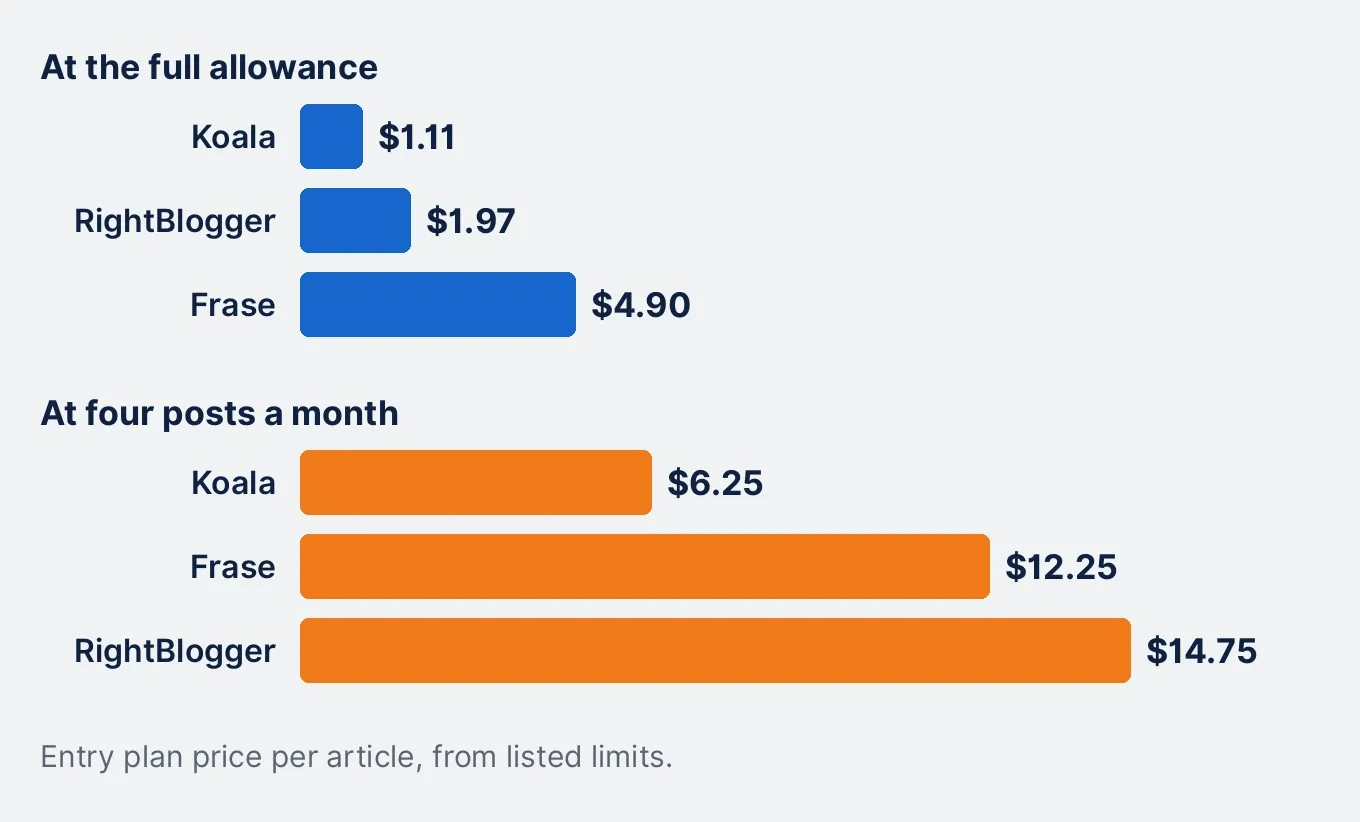
- Per article, Koala cost about $1.11 and Frase $4.90 on entry plans, before any editing time.
- ChatGPT, Claude, Grammarly and Rytr have ongoing free plans. Koala's free words are a one-time allowance.
- Google asks for accurate, reviewed content however it is made, so budget time to fact-check every draft.
The best AI writing tools for bloggers are the ones that fix your slowest step. ChatGPT and Claude suit hands-on research and drafting. Koala and RightBlogger work as an AI blog writer that drafts and publishes. Frase adds SEO briefs, Jasper adds team brand control, and Grammarly handles the final edit.
This market moves fast. When this page was last checked on 2 September 2026, Rytr was a low-cost writing pick. By 5 November its homepage called it a relationship manager. Two other popular names now lead with AI visibility tracking. So this guide shows what each tool sells today, and what one article really costs.
How this guide was checked: every price and limit comes from the vendor's own page on 5 November 2026, in US dollars before tax. Anobee has not run all of these tools side by side, so this is not a ranking of writing quality. The one hands-on result here is a single ChatGPT and Claude test, labelled below. This guide contains no affiliate links.
AI writing tools compared by job
| Tool | Best job | Free access | Paid entry | Main limit |
|---|---|---|---|---|
| ChatGPT | Research and drafting | Free plan | Go $8, Plus $20 | No SEO score or CMS publishing by default |
| Claude | Long source packs | Free plan | Pro $20, or $17 yearly | Usage limits apply on every plan |
| Koala | SEO articles in bulk | 5,000 words, one time | Starter $25 | Free words do not renew |
| RightBlogger | Drafting and auto-posting | 2,000 words a month | Solo $59, or $49 yearly | One site on Solo |
| Frase | SEO-led briefs | 7-day trial | Starter $49, or $39 yearly | 10 articles a month |
| Jasper | Team brand control | 7-day trial | Pro $69, or $59 yearly | Priced per seat |
| Grammarly | Final editing | 100 AI prompts a month | Pro $12 | Edits more than it drafts |
A general assistant and a dedicated AI blog writer are different purchases. With ChatGPT or Claude, you direct every step. With Koala or RightBlogger, you hand over more of the process and spend your time reviewing.
Tools for writing and drafting
1. ChatGPT: the flexible starting point
ChatGPT is the broadest of these AI writing tools. The free plan offers unlimited text chats, subject to abuse guardrails, plus limited uploads and deep research. Go costs $8 a month and may include ads. Plus costs $20 and adds projects and expanded research [1].
Use it when you want to steer the outline, the angle and each revision. The tradeoff is structure: it will not verify your sources for you. Check the training setting too, because OpenAI's plan table says content is used to train models unless you opt out [1]. Anobee's ChatGPT prompts for SEO can give it a narrower job.
2. Claude: long documents and source packs
Claude suits writing that depends on several supplied documents. The free plan has limited usage every five hours and every week. Pro costs $20 a month, or $17 a month with an annual subscription [2]. Limits still apply on paid plans, so "paid" does not mean unlimited.
What Anobee saw: on 26 August 2026, Anobee gave ChatGPT and Claude the same brief for a 450 to 550 word opening. ChatGPT ran past the word limit and repeated itself, so the first edit was cutting. Claude stayed in range but turned the requested headings into bold text. The plans differed, so this was one workflow test, not a benchmark. The ChatGPT vs Claude comparison has the details.
Run the same brief yourself, because one test cannot tell you which suits your voice.
Tools that work as an AI blog writer
If your searches look like "best AI blog writer", you probably want more than a chat window. These tools draft articles and connect to your site.
3. Koala: SEO articles at a low word price
Koala is built for SEO articles. KoalaWriter drafts each post using your business details, and an SEO agent reads Search Console to suggest what to publish [3]. Starter costs $25 a month for 45,000 words, and connects to WordPress, Shopify, Webflow and Ghost. The free plan is a one-time allowance of 5,000 words [3].
That allowance is enough for one or two real articles. Use it on a topic you know well, so you can spot errors quickly.
4. RightBlogger: blogging and auto-posting
RightBlogger is the most blog-specific tool here. The Solo plan covers one site with keyword research, AI article writing and one automated post a day, for $59 a month or $49 billed yearly. A free account gives 2,000 words every month [4].
Automation does not replace approval. An automated post a day is about 30 posts a month for you to review, and that review is the real workload.
5. Frase: briefs and SEO scores
Frase combines research, drafting, SEO and GEO scores, and publishing to WordPress, Webflow, Sanity or Wix. Starter covers one site and 10 articles a month, at $49 monthly or $39 billed yearly, with a 7-day trial [5].
Pick it when keyword research and optimization are slowing you down. Treat any score as a diagnosis, because a higher score does not prove that an article is accurate. Anobee tried five free SEO content checkers on one article, and the scores it got back ranged from 64 to 87.
Tools for teams and editing
6. Jasper: brand control for a marketing team
Jasper suits several people who need one approved voice. Pro includes one seat, two Brand Voices, five knowledge assets and three audiences, at $69 a month or $59 per seat billed yearly, with a 7-day trial [6]. For one blogger, that is a lot of control to pay for. Consider it when inconsistent team output is the actual problem.
7. Grammarly: the final edit
Grammarly belongs at the end of the process. The free plan covers grammar and tone with 100 AI prompts a month, and Pro at $12 adds plagiarism and AI text detection with 2,000 prompts [7]. It will not replace a drafting tool, but it pairs well with one.
4 popular tools that changed direction
Many roundups still list these as AI writers. Check what they sell now before you subscribe.
| Tool | Listed as | What its own page leads with now | Price checked |
|---|---|---|---|
| Rytr | Budget writer | Relationship follow-up across email and meetings | Lite $9 |
| Writesonic | SEO writer | Brand tracking across AI search | Starter $79, billed yearly |
| Surfer | SEO content tool | AI visibility tracking | Discovery $49, billed yearly |
| Copy.ai | Marketing copy | Sales and marketing workflows | Chat $29 |
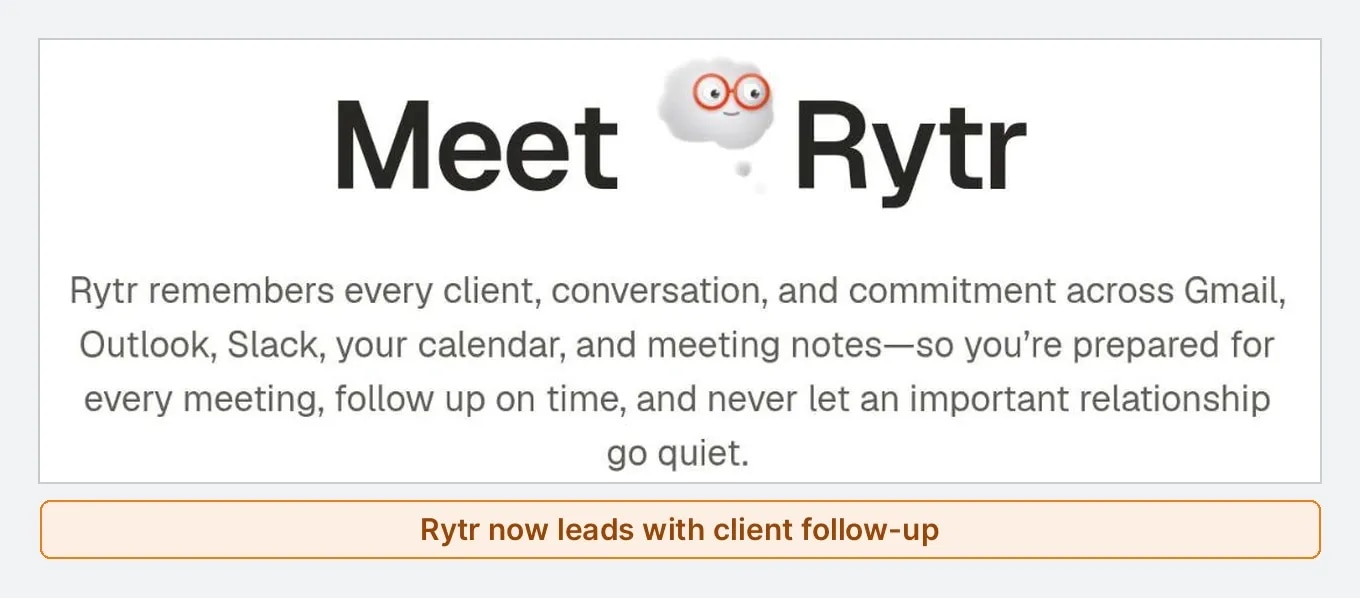
Rytr is the sharpest change. It still has an AI writing assistant, and the free plan keeps 10,000 characters a month. But the page now also counts relationships, research runs and briefings [8]. The earlier version of this guide listed its yearly price at $7.50. Today it is a poor fit for long blog posts, so it lost its place in the picks.
Writesonic includes 15 AI articles a month on Starter, but the plan leads with brand tracking, and at $79 you are paying for that [9]. Surfer still has its Content Editor, now framed around AI answers as well as search [10]. Copy.ai offers five seats and unlimited words in chat for $29, which suits a small team more than one blogger [11].
All four still work. Reread the pricing page before you trust any list, this one included.
What one AI-written article really costs
Monthly prices hide the useful number. Here is the entry price divided by what each plan allows.
| Plan | Monthly price | Allowance | Cost per article |
|---|---|---|---|
| Koala Starter | $25 | 45,000 words | About $1.11 for 2,000 words |
| RightBlogger Solo | $59 | About 30 automated posts | About $1.97 |
| Frase Starter | $49 | 10 articles | $4.90 |
| ChatGPT Plus or Claude Pro | $20 | No article count | Depends on usage limits |
These are Anobee's calculations from the listed limits, and they assume you use the full allowance. If you publish four posts a month, Frase costs about $12 per post and RightBlogger about $15. Koala is about $6.
A cheap draft that needs two hours of fact-checking costs more than a slower one that needs twenty minutes.
Free AI writing assistants, and other writing jobs
Bloggers are not the only people asking for an AI writing assistant. If you want a free one online, start with ChatGPT or Claude, which both run in a browser, a desktop app and on mobile [1] [2]. Grammarly's free plan is the better choice when you already have a draft and only want to improve your writing.
The best AI writing assistant still depends on the job:
| Writing job | Start with | Why |
|---|---|---|
| Blog posts | Koala or RightBlogger | Built to draft and publish articles |
| Long reports or guides | Claude or ChatGPT | You can work from your own sources |
| AI copy writing for a brand | Jasper | Stores Brand Voices for a team |
| AI script writing for video | ChatGPT or Claude | You can set the format and revise line by line |
| Emails and short text | Grammarly | Adjusts tone inside your draft |
That table is Anobee's reading of each tool's plan page, not a writing quality test. For scripts, none of these seven sells a dedicated script tool on the pages we checked, so a general assistant is the honest starting point.
How to choose AI writing tools
Start with the step that delays your posts. Look at your last three articles and note where the work stalled: sources, outline, drafting, voice, on-page SEO or publishing.
- Name the slowest step. One tool does not need to solve all of them.
- Choose control or automation. Automation saves time only when your inputs and quality bar are already clear.
- Check the limit behind "unlimited". Words may be unlimited while workflows, sites or research are capped.
- Read the data terms. Check how your plan treats uploads before you add client documents.
Then run a two-article trial. Use the same brief, sources and voice sample in each tool. Write one how-to and one comparison, and record the corrective work:
| Measure | What to record |
|---|---|
| Unsupported claims | Statements you removed because no source supported them |
| Source errors | Broken links or claims missing from the cited page |
| Missed instructions | Headings or exclusions the tool ignored |
| Voice corrections | Passages you rewrote to sound like your blog |
| Editing time | Minutes from first draft to approved copy |
| Publishing steps | Manual actions after the writing was finished |
Keep the winner only if it reduces your total work. Anobee's guide to humanizing AI content covers the editing stage.
Do bloggers need paid AI writing tools?
Not at the start. A free plan shows whether AI improves your process at all. Pay when one of these happens every week:
- the free allowance stops a real article midway
- you need larger source files or longer context
- several writers need shared brand rules
- SEO review or publishing takes longer than drafting
One impressive paragraph is not a reason to upgrade. Test the whole workflow, including the dull work after the draft.
Can AI-written blog posts rank in Google?
They can, but AI use is not what Google judges. Its guidance says to focus on accuracy, quality and relevance. It also warns that generative models predict likely words instead of retrieving facts, and that it is critical to fact-check and review AI output manually [12].
Generating many pages without adding value for users can break Google's scaled content abuse policy, however those pages are made [13]. So the risk grows with volume and thin content, and auto-posting tools deserve the most care. Anobee's guide on whether Google can detect AI content goes further.
Which AI writing tools to start with
Pick the smallest tool that solves a problem you can already describe.
- One flexible assistant: give ChatGPT and Claude the same brief, and keep the one that needs fewer corrections.
- Low-cost SEO drafts: try Koala's free words on one real topic.
- Hands-off publishing: put RightBlogger through a real week of posts.
- SEO-led content: use Frase's trial when optimization is the bottleneck.
- A team voice: test Jasper when several people write for one brand.
- Cleaner final copy: add Grammarly's free plan to any of these.
AI writing tools change quickly, so choose one job, test it on real work, and recheck the pricing page before you renew.
Frequently Asked Questions
What is the best AI writing tool for bloggers?
There is no universal winner. ChatGPT and Claude suit bloggers who want control over each step. Koala and RightBlogger suit bloggers who want an AI blog writer that drafts and publishes. Test two with the same brief before you pay.
What is the best free AI writing tool for bloggers?
ChatGPT and Claude are the strongest free starting points for long drafts, because both have ongoing free plans. Grammarly's free plan suits editing, with 100 AI prompts a month. RightBlogger gives 2,000 free words a month.
Can an AI blog writer publish without human review?
Some can publish on their own, including Frase and RightBlogger. Google says it is critical to fact-check and review AI-generated content manually, so a person should still approve each post before it goes live.
Does Google penalize AI-written blog content?
Google tells publishers to focus on accuracy, quality and relevance however content is produced. Generating many pages without adding value for users can violate its scaled content abuse policy. AI use alone is not the deciding issue.
How should I test an AI writing tool before paying?
Give each candidate the same brief and sources for two real articles. Record unsupported claims, missed instructions, editing minutes and publishing steps. Keep the tool that reduces your total work without lowering accuracy.
Sources and References
- ChatGPT: Plans and pricing ↩
- Claude: Pricing ↩
- Koala AI: Pricing ↩
- RightBlogger: Pricing ↩
- Frase: Pricing ↩
- Jasper: Pricing ↩
- Grammarly: Plans ↩
- Rytr: Pricing ↩
- Writesonic: Pricing ↩
- Surfer: Pricing ↩
- Copy.ai: Pricing ↩
- Google Search Central: Guidance on using generative AI content ↩
- Google Search Central: Spam policies ↩
Was this guide helpful?
Your answer helps Anobee improve future updates.

Written by
Bibek Thapa
AI-Powered Digital Growth Strategist
Bibek Thapa works across AI workflows, SEO, AI search optimization, content strategy, website growth, and productivity systems at Anobee.
- AI workflows
- Digital growth
- SEO
- GEO
- AEO
- Content strategy
- Website growth